Choosing between Flashforge Creator 5 and Creator 5 Pro can feel difficult because both are strong four-toolhead 3D printers. They share the same Creator 5 Series foundation, but they are built for slightly different users.
If you mainly want an affordable printer for multi-color PLA, PETG, TPU, creative models, education, and light production, Creator 5 is the better value choice. If you often print ABS, ASA, PA, PC, carbon fiber reinforced materials, engineering prototypes, or small batch functional parts, Creator 5 Pro is the better fit because it adds an enclosed frame, active chamber heating, and filtration.
In this guide, you will learn the key differences between Creator 5 and Creator 5 Pro, how their open and enclosed designs affect material choice, and which model makes more sense for your printing workflow.
Creator 5 Pro vs Creator 5 at a Glance
Creator 5 is the better value choice if your work focuses on common filaments, color, creativity, and efficient multi-material printing. Creator 5 Pro is the better long-term choice if your work depends on chamber-sensitive materials and more controlled print conditions.

Quick Comparison Table
|
Feature |
||
|
Best for |
Multi color models, creative projects, education, home use, light production |
Engineering prototypes, ABS, ASA, PA, PC, carbon fiber reinforced materials, controlled small batch production |
|
Frame type |
Open frame |
Fully enclosed rigid frame |
|
Toolhead system |
Four independent FlashSwap toolheads |
Four independent FlashSwap toolheads |
|
Build volume |
256 × 256 × 256 mm |
256 × 256 × 256 mm |
|
Build plate |
PEI flexible steel build plate |
PEI flexible steel build plate |
|
Active chamber heating |
No |
Yes, up to 65°C |
|
Air filtration |
Not the key focus |
HEPA13 filter plus activated carbon |
|
Max extruder temperature |
320°C |
320°C |
|
Max bed temperature |
120°C |
120°C |
|
Better value if |
You mainly print PLA, PETG, TPU, PVA, BVOH, and creative materials |
You often print ABS, ASA, PA, PC, PC ABS, PPS CF, and reinforced engineering materials |
Flashforge’s Creator 5 product page highlights four independent toolheads, multi-color and multi-material printing, zero purge waste, 600 mm/s high-speed performance, and automatic calibration. The Creator 5 Pro page lists the same four-toolhead foundation, then adds a fully enclosed frame, active chamber heating up to 65°C, air filtration, and continuous airflow control.
Main Difference Between Creator 5 Pro and Creator 5
The main difference is the printing environment. Creator 5 is an open-frame four-toolhead printer for common and creative materials, while Creator 5 Pro is a fully enclosed four-toolhead printer with active chamber heating and filtration for more demanding materials.
Creator 5 is the better value choice for multi-color and multi-material printing with common filaments. Creator 5 Pro is the safer choice for users who regularly print engineering materials and need a more controlled chamber environment.
What Both Creator 5 Printers Have in Common
Both Creator 5 and Creator 5 Pro use four independent FlashSwap toolheads instead of one shared nozzle with repeated filament loading and unloading. This is the main advantage of the Creator 5 Series. Each toolhead can stay assigned to its own color or material, which helps reduce repeated loading, unloading, purge waste, and color contamination during frequent material changes.
This makes both printers more practical for multi-color and multi-material workflows than a single nozzle system. If you want a deeper explanation of this type of machine, Flashforge’s guide to multi tool head 3D printers explains how independent toolheads improve material switching, support workflows, and desktop production. Flashforge’s own blog states that both Creator 5 and Creator 5 Pro use the same four toolhead FlashSwap architecture and 256 × 256 × 256 mm build volume.
Both machines also provide the same 256 × 256 × 256 mm build volume and a removable PEI flexible steel build plate. This makes the choice easier because buyers do not lose print size by choosing the standard Creator 5. Both printers can handle decorative models, product prototypes, functional parts, small batches, educational models, and multi-color display parts.
Open Frame vs Enclosed Heated Chamber
The open frame versus enclosed chamber decision is the most important part of this comparison. It affects material choice, print stability, workspace planning, and long-term value.
Key Difference of Open Frame vs Enclosed Heated Chamber
Creator 5 is an open-frame printer for common materials and lower cost. It is easier to access and makes sense for users who mainly print PLA, PETG, TPU, and support materials.
Creator 5 Pro is a fully enclosed printer with active chamber heating for more stable engineering material printing. Its enclosed structure, 65°C heated chamber, and airflow system help create a more controlled environment for materials that are more sensitive to temperature changes. Flashforge states that Creator 5 Pro’s heating mode rapidly heats to 65°C and helps reduce warping and cracking for ABS, ASA, PC, and PA.
When to Choose Open Frame Creator 5
Choose Creator 5 if you mainly print PLA, PETG, TPU, and similar materials, and your goal is multi color models, daily use, education, or cost efficiency.
Creator 5 makes sense because it costs less, gives easier access to the print area, and provides enough capability for most common filaments. You do not need to pay for chamber heating if your workflow does not rely on chamber-sensitive engineering materials.
It is a strong fit for creative users who print colorful display models, toys, decorations, personalized products, teaching models, TPU projects, and simple prototypes.
When to Choose Enclosed Heated Chamber Creator 5 Pro
Choose Creator 5 Pro if you often print ABS, ASA, PA, PC, PC ABS, PPS CF, or fiber-reinforced materials, or if you need more stable results for functional parts.
The enclosed structure helps reduce temperature fluctuation. Active chamber heating up to 65°C helps reduce warping and cracking in engineering materials. The Pro model is also a better match for small batch production where failed prints, unstable dimensions, or cracked parts would waste time and material. Flashforge lists the Creator 5 Pro with active chamber heating, HEPA13 plus activated carbon filtration, supported enclosure materials including PC, PA, PC ABS, and PPS CF, and a 320°C maximum extruder temperature.
Keep in mind that the heated chamber improves stability, but print quality still depends on filament drying, slicing settings, model design, bed adhesion, and proper material profiles.
Material Support and Print Workflow
Material support is where the difference between Creator 5 and Creator 5 Pro becomes more obvious. Both printers can handle many common materials, but Creator 5 Pro gives users more control for engineering filaments.
Best Materials for Creator 5
Creator 5 is best for common and creative 3d printer filament options such as PLA, PETG, TPU90A and TPU95A, PLA CF, PETG CF, PET, silk PLA, PVA, BVOH, S Multi, and S PATH.
This material range works well for colorful models, educational projects, creative products, flexible prints, light functional parts, and support material workflows. It is also a practical option for users who want four toolhead printing without moving into a higher-cost enclosed heated chamber.
For users still comparing filament choices, Flashforge’s guide to 3D printer filament types is a useful internal reference because it explains how PLA, ABS, PETG, TPU, nylon, and specialty filaments differ in printability, strength, heat resistance, and use cases. Flashforge notes that filament choice should match project requirements, printer compatibility, ease of use, cost, and post-processing needs.
Best Materials for Creator 5 Pro
Creator 5 Pro is the better choice for ABS, ASA, PA, PC, PC ABS, PPS CF, PA CF, PET CF, PAHT CF, ASA CF, ABS CF, and PPA CF. These materials are more demanding because they may need higher nozzle temperature, stronger bed heating, controlled airflow, dry storage, and a more stable chamber.
Creator 5 Pro is designed for users who want to print stronger prototypes, engineering fixtures, functional housings, heat-resistant parts, carbon fiber reinforced parts, and small batch production pieces. Flashforge lists Creator 5 Pro with recommended filaments including PLA, PETG, TPU, PLA CF, PETG CF, PET, silk, PVA, BVOH, ABS, ASA, PA CF, PET CF, PAHT CF, ASA CF, ABS CF, and PPA CF, and also lists PC, PA, PC ABS, and PPS CF as supported with the enclosure.
Multi Color and Multi Material Printing
Both Creator 5 and Creator 5 Pro use four independent toolheads, so each material or color can stay assigned to its own toolhead. This reduces repeated loading, unloading, and purge waste compared with shared nozzle systems.
This workflow is useful for multi-color models, logos, display parts, educational models, prototypes with support material, and parts that combine different filament properties. It also reduces the risk of color contamination because each toolhead can be dedicated to a specific color or material path.
Which One Should You Choose?
The best 3d printer for you depends on your material plan, workspace, budget, and how often you need engineering-grade results. Do not choose only by price or only by the Pro label.

When to Choose Creator 5
Choose Creator 5 if you mainly print PLA, PETG, TPU, and other common materials for colorful models, toys, decorations, tabletop pieces, and simple prototypes.
It is a strong fit for home makers, hobby users, schools, creators, and small sellers who want efficient four-toolhead, multi-color, and multi-material printing without paying for chamber heating. It is also a better choice if you prioritize lower cost, easy access, and a straightforward workflow.
Creator 5 is suitable if you do not rely heavily on chamber-sensitive materials like ABS, PA, or PC. You still get the main Creator 5 Series advantage: four independent FlashSwap toolheads for faster, cleaner material switching and more practical color or material changes.
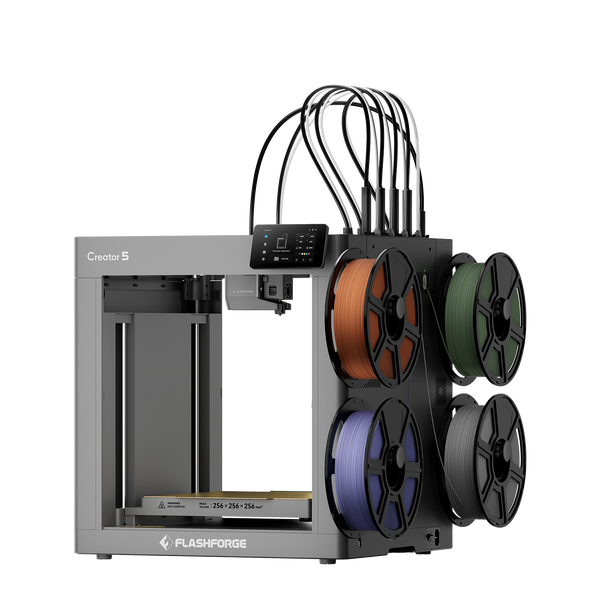
Flashforge Creator 5 4-Toolheads Multi-Color 3D Printer | 500% Faster, Zero Purge Waste
When to Choose Creator 5 Pro
Choose Creator 5 Pro if you regularly print ABS, ASA, PA, PC, or carbon fiber reinforced filaments, or if your projects require better temperature control and higher material stability.
It is designed for designers, engineers, professional studios, and users who need more reliable results with engineering materials. It is also a better choice if failed prints, warping, cracking, or unstable chamber conditions would cost more than the price difference.
Creator 5 Pro is also the stronger long-term option if you plan to expand into more demanding materials and production workflows over time. Flashforge’s guide to best high speed 3D printers describes Creator 5 Pro as built for professional multi-color and multi-material workflows, with four independent FlashSwap toolheads, a 256 × 256 × 256 mm build volume, automatic offset calibration, a fully enclosed frame, and active chamber heating up to 65°C.
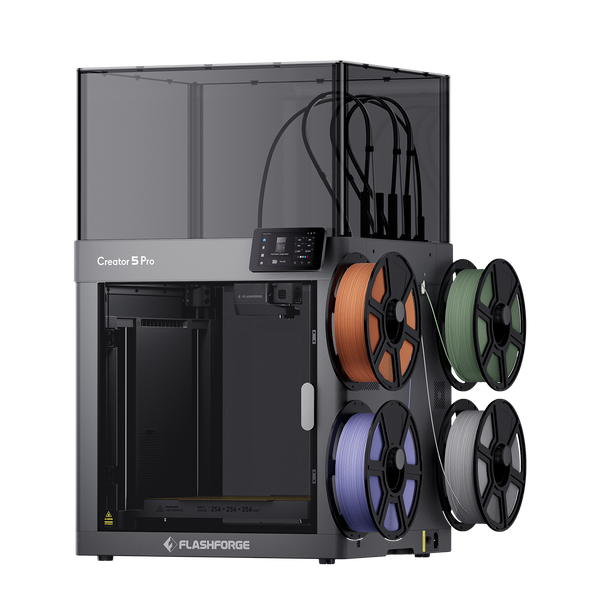
Flashforge Creator 5 Pro 4-Toolheads Enclosed Multi-Color 3D Printer | 500% Faster, Zero Purge Waste
Conclusion
Choose Creator 5 if you want the best value for four-toolhead multi-color and multi-material printing with common filaments. It is practical for creative models, home projects, education, light production, and users who mainly print PLA, PETG, TPU, PVA, BVOH, and other easier materials.
Choose Creator 5 Pro if your work depends on engineering materials, enclosed chamber stability, active chamber heating, filtration, and more controlled production results. It is the better choice for ABS, ASA, PA, PC, PC ABS, PPS CF, carbon fiber reinforced filaments, engineering prototypes, and small batch functional parts.
The simple answer is this: Creator 5 is the value choice for creative multi-color printing. Creator 5 Pro is the more capable choice for engineering material printing.
FAQ
Is Creator 5 Pro Better Than Creator 5?
Creator 5 Pro is better if you need an enclosed printer with active chamber heating, filtration, and stronger engineering material support. Creator 5 is better if you mainly print common materials and want a lower-cost four-toolhead printer for multi-color and creative workflows.
Is Creator 5 Pro Faster Than Creator 5?
Creator 5 Pro and Creator 5 have similar headline speed specifications. Both use four independent toolheads and support high-speed performance. The biggest difference is not basic speed but material stability. Creator 5 Pro is better for chamber-sensitive materials because its enclosed heated chamber can improve consistency for engineering prints.
Is Creator 5 Good for Beginners?
Creator 5 can be a good fit for beginners who want to start with multi-color or multi-material printing and are comfortable learning a four-toolhead workflow. It includes automatic calibration and leveling, which reduces setup difficulty. However, beginners who only need simple single-color PLA printing may not need a four-toolhead system. If you are comparing current models, bundles, or discounts before buying, the Flashforge 3d printer for sale page is a better place to check live offers.
Which Printer Is Better for Product Prototyping?
Creator 5 is a good choice for visual prototypes, colorful design models, teaching models, and simple functional tests. Creator 5 Pro is better for engineering prototypes that need ABS, ASA, PA, PC, PC ABS, PPS CF, or fiber-reinforced materials.
If your prototype needs heat resistance, dimensional stability, or stronger material performance, choose Creator 5 Pro.
Are Creator 5 and Creator 5 Pro Accessories Compatible?
Most Creator 5 Series workflow accessories are designed around the same platform, but you should always check the current product page, user manual, or Flashforge support before buying replacement parts or accessories. The biggest hardware difference is that Creator 5 Pro has an enclosed frame, active chamber heating, filtration, auxiliary cooling, and door detection features, which the standard Creator 5 does not include.