

A 3D printer can turn a spare room into a creative workspace, but it also raises a practical question: what happens to the air while a model prints? Whether you are making desk organizers or engineering prototypes, material choice and room setup deserve attention before the first layer begins.
3D printing can release potentially harmful particles and chemicals. The risk depends on the printing process, material, temperature, ventilation, and exposure duration. Filament printing and liquid-resin printing also involve different handling requirements. Understanding those differences helps you choose a suitable printer and build safer habits.
Is 3D Printing Toxic? What the Question Really Means
In 3D printing, the useful distinction is between a material’s potential hazards and your actual exposure during printing, cleaning, or finishing.
Airborne Emissions From Heated Filament
A filament 3D printer uses fused deposition modeling (FDM), also called fused filament fabrication (FFF), to heat a strand of plastic and deposit it layer by layer. Heating can release ultrafine particles and volatile organic compounds, or VOCs—chemicals that enter the air as gases.
NIOSH identifies ultrafine particles as particles smaller than 100 nanometers. These emissions are an exposure concern even when no visible smoke appears. However, detecting emissions does not establish that every print causes illness. Research into the long-term health effects of specific desktop-printing exposures remains incomplete.
Exposure Depends on the Whole Setup
A printer beside your desk for an eight-hour workday presents a different exposure situation from a printer in a separate, ventilated workroom. Room airflow, time spent nearby, and the number of machines all affect the setup you need.
NIOSH’s safe 3D printing guide considers hazards throughout the workflow, including preparation, printing, maintenance, and post-processing. Evaluate the complete activity rather than judging safety from the filament label alone.

Smell Is Not an Exposure Measurement
A strong odor can alert you to a problem, but a mild smell does not establish that the air is safe. NIOSH explains that both particles and gases can be invisible, and only some gases have noticeable odors. Avoid using your nose as the test for whether ventilation is working.
This distinction matters when switching materials: a less noticeable smell is not proof that particles have disappeared. Base your precautions on the process and material guidance, rather than waiting until a print smells unpleasant.
How Material Choice Changes the Risks
Choose materials for the part’s intended purpose, then check the controls needed to use them. No single material ranking applies to every formulation and printer.
PLA and PETG Still Require Ventilation
PLA is a practical starting material for models, organizers, and visual prototypes. NIOSH notes that PLA often releases fewer particles than ABS, making it a useful substitution when the project does not require ABS’s properties. This does not make PLA emission-free.
PETG is another common 3D printer filament, but it should not automatically be described as nontoxic during printing. Formulation, additives, and operating conditions matter. A material’s suitability for a finished object is a separate question from exposure while heating it.
If you are deciding whether PLA meets your project’s needs, Flashforge’s PLA plastic 3D printing guide for beginners explains its everyday applications and limitations.
ABS and Engineering Filaments Need More Planning
ABS, ASA, nylon, and other engineering materials can solve problems that basic PLA cannot. However, their printing requirements should prompt a review of ventilation and containment before you start.
Do not assume two filaments with the same base polymer have identical emissions. NIOSH research identifies material formulation and color as factors affecting chemical releases. Reinforced filaments also deserve attention during finishing, when cutting or sanding can generate dust.
| Material or process | Main exposure consideration | Practical starting point |
|---|---|---|
| PLA | Particles and gases during heating | Use ventilation and the recommended print profile |
| PETG | Emissions vary with formulation and settings | Review material guidance; maintain airflow |
| ABS, ASA, and engineering filaments | Material-specific emissions and operating requirements | Plan containment and ventilation for the task |
| Liquid-resin printing | Uncured resin, vapors, cleaning chemicals, and finishing dust | Follow the resin’s safety data sheet and process instructions |
Liquid Resin Adds Direct-Contact Hazards
Desktop vat-resin printers cure liquid photopolymer with light. Their risks include contact with uncured resin, alongside airborne emissions. NIOSH warns that uncured resin ingredients can cause skin irritation or allergic sensitization. Washing solvents such as isopropyl alcohol add handling concerns.
Wear gloves selected for the resin and solvent, use appropriate eye protection, and keep wash containers closed when practical. Complete the prescribed washing and curing process. Follow the material’s safety data sheet (SDS) for handling and disposal; water-washable resin does not automatically belong down a household drain. NIOSH’s desktop resin printing guidance covers these stages in more detail.
How to Reduce Exposure When Printing Indoors
For a desktop 3D printer, a safer workflow combines material selection, suitable placement, and emission controls. Buying a filter alone does not address every exposure route.
Choose a Dedicated Location and Control Airflow
As a practical precaution, use a separate work area instead of a bedroom or a desk where someone spends the day. Separation should accompany ventilation; the closed door of an enclosed 3D printer does not itself remove emissions.
NIOSH recommends ventilation controls such as local exhaust, which captures emissions near the printer. Depending on the installation, this may involve an appropriately designed enclosure exhausted outdoors. A fan that only moves air around the room does not provide the same control.
For frequent printing, multiple machines, or regular engineering-material use, have the ventilation arrangement assessed for that workload. An occasional hobby setup should not automatically become a production space without reviewing airflow.
Flashforge’s guide to reducing exposure to 3D printer fumes provides additional context for arranging an indoor printing area.
Understand What HEPA and Activated Carbon Do
HEPA filters capture airborne particles. Activated carbon targets certain gases through adsorption, in which molecules attach to the filter material. These functions complement each other, but neither guarantees complete removal of every emission.
The EPA’s air-cleaner guidance explains that gas removal depends partly on having enough activated carbon. Performance also depends on airflow, operating time, and maintenance. A filter’s laboratory efficiency should not be treated as the percentage of all pollutants removed from an entire room.
Even with the best home 3D printer, use filtration alongside source control and ventilation. Replace filters as instructed, and remember that a printer’s circulation system is not necessarily an outdoor exhaust connection.
Use Suitable Temperatures and Finish Carefully
Start with the material manufacturer’s recommended profile. NIOSH advises using the lowest recommended printing temperature; do not lower it below a workable range or compromise the part’s quality.
Keep the nozzle clean according to the printer instructions. After printing, follow the manufacturer’s ventilation and cooldown procedure before opening an enclosure. There is no universal waiting time that proves every chamber is clear.
Include sanding, support removal, and solvent cleaning in your plan. Capture finishing dust and follow the relevant material guidance instead of assuming the exposure concerns end when printing stops.
Before a longer job, check three practical details:
- Confirm that the material profile matches the loaded filament.
- Check that the intended ventilation and filtration equipment is operating.
- Prepare a clear place to cool, remove, and finish the model without spreading debris into shared living areas.
Choosing a Flashforge Printer for Your Workspace
Once you understand the material and room requirements, printer features become easier to assess. Enclosures, filtration, and monitoring can support exposure controls when used correctly.
Adventurer 5M Pro for Everyday Projects
For someone making household organizers, classroom models, or prototypes, the Flashforge Adventurer 5M Pro combines an enclosed design with HEPA and activated-carbon filtration. Its internal and external circulation modes let users follow the appropriate airflow arrangement for the material and print conditions.
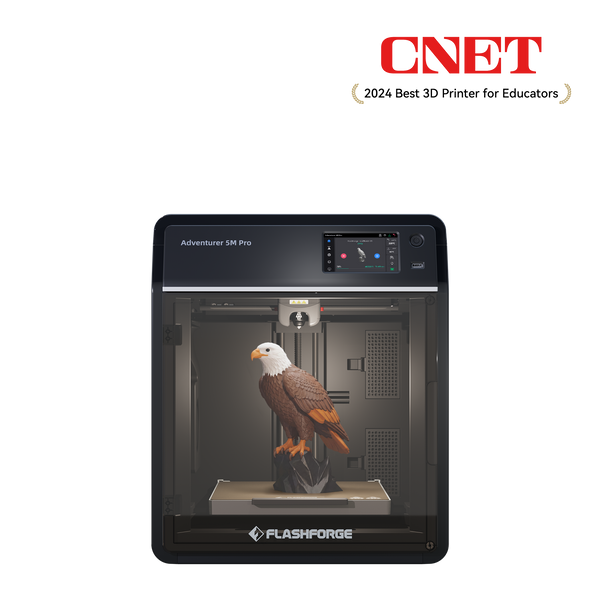
Flashforge Adventurer 5M Pro 3D Printer
Built-in camera monitoring can also reduce the need to stand beside the machine throughout a job. This is useful when the printer occupies a separate work area, although remote viewing does not replace appropriate supervision or the operating instructions.
The practical benefit is an integrated enclosure-and-filtration setup. Continue to ventilate the room and maintain the filters; those features do not certify every installation as safe.

Creator 5 Pro for Engineering-Material Workflows
If projects require more demanding materials or multiple materials in one model, the Flashforge Creator 5 Pro offers four independent toolheads, an enclosed chamber, and active chamber heating up to 65°C. Chamber heating supports controlled printing conditions; it is not an air-purification function.
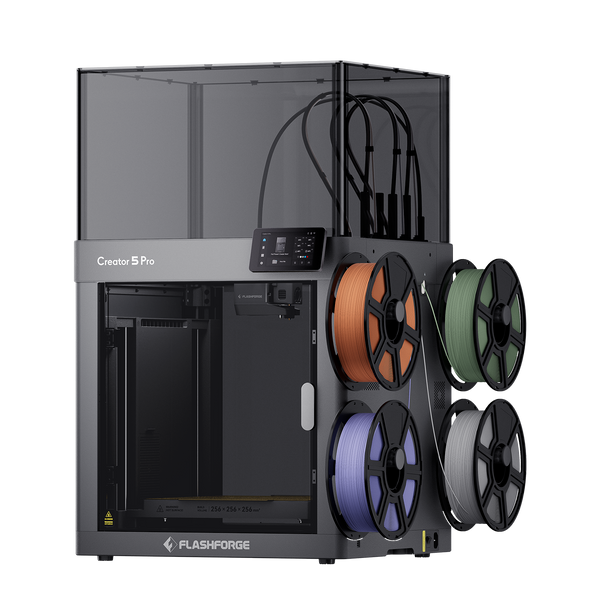
The printer separately includes HEPA13 and activated-carbon filtration. Those features are relevant when planning a workspace for compatible engineering filaments, but material capability and exposure control remain separate considerations.
Choose it because your projects need its material-handling and chamber features, then match the ventilation plan to the materials and printing frequency.
Frequently Asked Questions
These questions address common decisions about printer placement, filtration, and shared spaces.
Is PLA Safe to Print in a Bedroom?
A bedroom is a poor default location because people spend extended periods there. PLA can release particles and gases even with little noticeable odor. Prefer a separate, ventilated work area. An enclosed printer can support containment, but its enclosure does not establish that overnight bedroom exposure is acceptable.
Does an Enclosed 3D Printer Eliminate Toxic Fumes?
No. An enclosure helps separate the printing process from the room, but performance depends on its design, airflow, filtration, and use. An unventilated enclosure may retain emissions that escape when opened. Assess the complete control system rather than treating a door and cover as proof of clean air.
Can an Air Purifier Replace Ventilation?
It should be a supplement. A suitable HEPA unit can reduce airborne particles, while sufficient activated carbon can address some gases. Air cleaners cannot remove every pollutant. Select equipment for the space and keep its filters maintained, while addressing emissions at the printer and providing appropriate ventilation.
Is 3D Printing Safe Around Children?
It requires an organized setup and adult supervision. Keep children away from hot components, moving parts, uncured resin, and cleaning chemicals. In classrooms, NIOSH recommends a written plan covering materials, equipment, work practices, and exposure controls. Printer selection is only one part of that plan; room arrangements and staff procedures matter too.
How Long Should I Wait Before Opening the Printer?
Follow the printer manufacturer’s instructions for ventilation and cooldown. NIOSH advises waiting before opening a closed filament printer, but does not provide a universal time that fits all installations. Material, chamber design, and airflow differ. Avoid putting your face inside the enclosure when retrieving a print.
Build Safer Habits Before Your Next Print
Start with the material your project actually needs, place the printer in a suitable work area, and check how emissions will be controlled. Match enclosure and filtration features to that plan, then include cleaning and finishing in the routine. These decisions make safety part of everyday printing rather than an afterthought.