Multicolor and full color 3D printers create different types of color output. A multicolor 3D printer uses several pre-colored filaments for clearly separated areas, such as white labels on a black tool organizer. A full color 3D printer combines color materials to reproduce gradients, textures, and realistic details, making it more suitable for projects such as custom pet figures.
What Is a Multicolor 3D Printer?
A multicolor 3D printer uses two or more colors in the same object. Most desktop 3D printer models rely on FDM or FFF technology, which melts thermoplastic filament and deposits it layer by layer. Although the printer can change between several colors, it usually treats each filament as a separate material rather than mixing them into a continuous range of new shades.
How Multicolor 3D Printing Works
Before 3D printing begins, the user divides the digital model into regions and assigns a filament color to each one in the slicing software. The printer follows these assignments during the build, switching colors whenever it reaches a differently colored section.
For example, a designer printing a tabletop character could assign red to the jacket, black to the boots, white to the eyes, and gray to the accessories. The printer can produce all four areas in one job, but the colors remain visually distinct. It will not automatically blend the red and black filaments into shadows or reproduce a detailed texture printed across the jacket.

Single-Nozzle Systems vs Multiple Toolheads
A single-nozzle system feeds several filaments through one shared nozzle. When the color changes, the printer unloads the current filament, loads the next one, and purges the remaining material. Frequent changes can increase print time and filament waste.
A multi tool head 3D printer keeps each color or material in a separate toolhead. It changes tools instead of repeatedly unloading and reloading filament, reducing the large purge cycles associated with shared-nozzle systems.
The differences between these approaches are explained further in AD5X vs Creator 5 vs Creator 5 Pro: Which Multi-Color System Is Better?.
Example: Four-Color Printing with the Flashforge Creator 5
The Flashforge Creator 5 uses four independent FlashSwap toolheads. Each toolhead can hold a separate filament, allowing up to four colors or materials in one model.
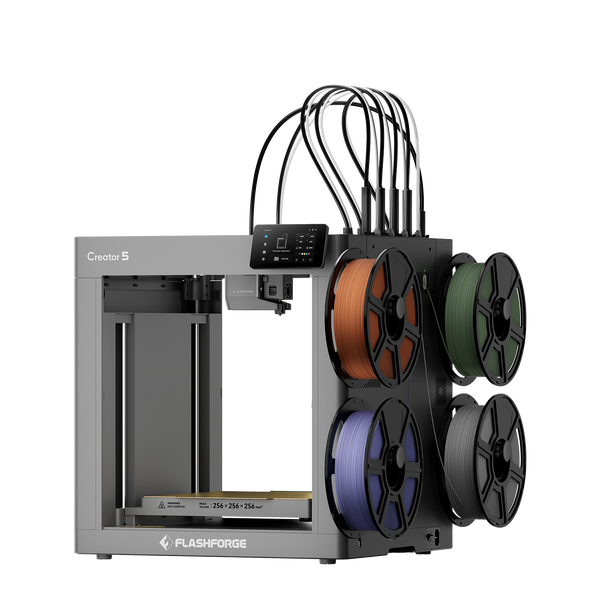
Flashforge Creator 5 4-Toolheads Multi-Color 3D Printer | 500% Faster, Zero Purge Waste
When another color is required, the active toolhead returns to its docking position and the printer selects the appropriate toolhead. This reduces switching time and prevents the previous filament from contaminating the new color.
The Creator 5 has a 256 × 256 × 256 mm build volume and supports materials including PLA, PETG, TPU, PVA, and BVOH. Its independent toolheads can also combine rigid and flexible sections or print a model with soluble support. Material combinations still need compatible temperatures, shrinkage behavior, and interlayer adhesion.
What Can You Make With a Multicolor 3D Printer?
A filament 3D printer with multicolor capability is well suited to projects with a limited number of clearly separated colors, including:
- Signs, logos, and raised lettering
- Toys and articulated models
- Board game pieces
- Architectural models
- Color-coded educational models
- Functional prototypes with contrasting features
- Parts combining rigid, flexible, or support materials
It is particularly useful when the finished object needs both recognizable color sections and practical material properties.
What Is a Full Color 3D Printer?
A full color 3D printer reproduces a much wider range of colors within one object. Instead of assigning one filament to each color, it combines color materials during printing.
This allows the printer to create gradients, skin tones, printed textures, small surface graphics, and transparent effects. Full color printing is therefore more suitable for projects where appearance is central to the finished product.
How Full Color 3D Printing Works
The process depends on the printer. In material jetting, printheads deposit very small droplets of build material and cure them layer by layer. Different color materials can be combined to reproduce the color information contained in the digital model.
This differs from an FDM 3D printer using material extrusion, where a nozzle deposits thermoplastic filament along a programmed path. NIST classifies material extrusion and material jetting as separate additive manufacturing processes in its report on additive manufacturing technologies.
The final color quality also depends on the source file. Accurate geometry, textures, and color data are necessary if the printer is expected to reproduce detailed surface information.

Full Color Describes a Capability, Not One Printing Technology
“Full color” describes the visual capability of a printer rather than one specific printing process. Full color systems may use material jetting, binder-based processes, or other specialized methods.
As a result, two full color printers may differ in material properties, support removal, surface finish, and post-processing. Buyers choosing the best multicolor 3D printer or full color system should evaluate the printing process and materials instead of relying only on the advertised number of colors.
Example: Full-Color Resin Printing with the Flashforge CJ270
The Flashforge CJ270 uses MJP material jetting with UV curing. It deposits photosensitive materials and cures them during printing, creating the model structure, surface color, and support within the same build.
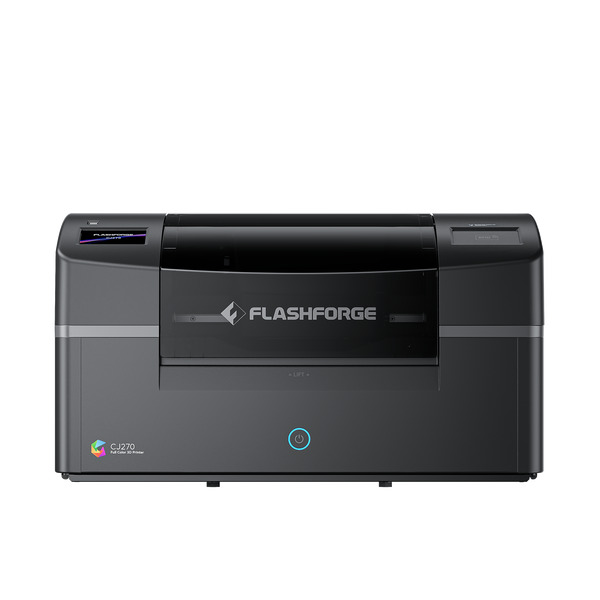
The material system includes cyan, magenta, yellow, black, white, clear, and water-soluble support. Together, these materials allow the CJ270 to reproduce more than 10 million colors, including smooth gradients, skin tones, subtle transitions, and transparent areas.
It has a 7 μm minimum layer thickness and a 180 × 120 × 100 mm build volume, making it better suited to small, detailed objects than large functional parts. The Flashforge CJ270 review provides more detail about its workflow, applications, and limitations.
What Can You Make With a Full Color 3D Printer?
Full color printing works best for objects where detailed appearance carries much of the product’s value, such as:
- Custom portraits and pet figures
- Tabletop miniatures
- Designer toys and collectibles
- Art pieces with gradients or transparent sections
- Anatomical and educational models
- Architectural presentation models
- Visual product prototypes
- Personalized products and short production runs
Multicolor vs. Full Color 3D Printer: Key Differences
| Feature | Multicolor 3D Printer | Full Color 3D Printer |
|---|---|---|
| Color result | Several separate solid colors | Broad color range with gradients and textures |
| Common process | FDM or FFF material extrusion | Material jetting or another specialized process |
| Color creation | Switches between pre-colored filaments | Combines color materials during printing |
| Materials | Thermoplastic filaments and support materials | Dedicated color, clear, white, and support materials |
| Best for | Functional parts, signs, toys, and color-coded models | Figures, art, visual prototypes, and display pieces |
| Material flexibility | Relatively broad | Limited to the printer’s material system |
| Post-processing | Support removal and occasional assembly | Cleaning, support removal, and optional polishing |
| Typical cost | Lower | Higher |
Color Range and Print Results
A multicolor printer is ideal for clear color boundaries. It can produce white lettering on a black sign or a model with differently colored components, but the available palette depends on the loaded filaments.
A full color printer can place detailed color information across curved surfaces. It is more suitable for faces, patterns, textures, and gradual transitions that would otherwise require painting.
Printing Technology
Multicolor FDM printers melt and extrude filament. Full color material jetting systems deposit and cure photosensitive materials.
Because the processes are different, comparing them only by nozzle speed or layer height can be misleading. The better comparison is the finished result required by the project.
Material Compatibility
Multicolor FDM offers more options when parts need flexibility, strength, heat resistance, or soluble supports. However, not every material combination will bond correctly.
Full color printers normally use dedicated materials developed for their color system. This improves control over color reproduction but limits third-party material choices. The CJ270 currently requires Flashforge’s dedicated materials.
Printing Speed
Neither type is always faster.
Multicolor FDM print time depends on model size, layer settings, tool changes, and purging. Independent toolheads can shorten jobs that contain frequent color changes.
Material jetting follows a different workflow, so its speed cannot be compared directly with an FDM printer’s millimeters-per-second specification. Printing, support removal, cleaning, and finishing should all be included when estimating total production time.
Material Waste
Shared-nozzle multicolor systems may create purge towers or flushed filament during color changes. Independent toolheads reduce this waste, although an initial purge or small prime structure may still be used.
Full color material jetting uses support material around complex features. This material is removed after printing, so the cost of a job should include both the finished model and its supports.
Printer Cost and Running Costs
Multicolor FDM printers generally have a lower purchase price and use more widely available materials. Full color printers require more complex printheads, color control, software, and dedicated consumables.
However, full color printing can reduce the time spent painting individual models. Businesses should therefore compare the total cost per finished product, including materials, maintenance, support removal, painting, and labor.
Which 3D Printer Is Better for Different Projects?
- Functional parts and prototypes: Multicolor or multi-material FDM is usually better because it provides more thermoplastic options.
- Toys and figures: Choose multicolor FDM for bold color sections and full color printing for faces, patterns, or realistic details.
- Art and creative projects: Full color suits gradients and transparent effects, while FDM works well for larger color-blocked designs.
- Product prototypes: Use FDM for functional testing and full color printing for visual presentation models.
- Educational projects: FDM suits color-coded components, while full color is useful for detailed anatomical or scientific models.
- Professional applications: Full color benefits studios producing personalized figures, while multi-material FDM is more suitable for engineering and functional workflows.
How to Choose Between a Multicolor and Full Color 3D Printer
The right choice depends on the appearance you want, the materials the finished part requires, and the amount of preparation and post-processing your workflow can support.
Decide Whether You Need Simple Colors or Realistic Color Detail
Choose multicolor printing when the design uses a limited number of solid colors with clear boundaries. Choose full color printing when it requires gradients, skin tones, detailed textures, or transparent sections.
Match Material Properties to How the Print Will Be Used
Functional parts may require flexibility, impact resistance, or heat resistance, making filament printing the more practical option. For figures, collectibles, and visual prototypes, color detail may matter more than engineering material performance.
Compare Upfront Costs and Ongoing Printing Expenses
Consider the printer price together with materials, support consumption, maintenance, cleaning, and operator time. Full color printing costs more, but it may reduce manual painting and assembly work.
Consider File Preparation, Maintenance, and Post-Processing
Multicolor FDM files require correct color or material assignments. Full color files need accurate textures and color information.
FDM printers require nozzle and extrusion maintenance, while full color resin systems also need material management, printhead care, and support cleaning. The complete workflow should fit the user’s workspace and experience.
Conclusion
A multicolor 3D printer uses several separate filament colors and is better suited to functional parts, signs, toys, and color-coded models. It also provides broader material options.
A full color 3D printer creates gradients, textures, skin tones, and transparent effects as part of the print. It is the stronger choice for detailed figures, art pieces, collectibles, and visual prototypes.
The decision ultimately depends on whether the project prioritizes material performance and defined colors or realistic visual detail.
FAQ
Can a Multicolor 3D Printer Mix Filaments to Create New Colors?
Most multicolor FDM printers switch between pre-colored filaments rather than mixing them. Specialized or experimental systems may blend compatible filaments, but they do not normally offer the same color range or surface control as a full color printer.
Is Multicolor Printing the Same as Multi-Material Printing?
No. Multicolor printing uses more than one color, while multi-material printing combines materials with different properties. A printer may support several colors without supporting every material combination.
Can a Standard Resin 3D Printer Print in Full Color?
A standard single-vat resin printer usually prints one resin color at a time. Changing resin may create separate color sections, but it cannot reproduce digitally mapped textures or smooth full color gradients.
Can You Upgrade a Multicolor FDM Printer to Full Color?
Not through a standard upgrade. FDM and full color material jetting use different material delivery, color control, curing, and software systems. Adding more filament channels does not turn an FDM printer into a full color printer.
Do Full-Color 3D Prints Still Need Painting?
Usually not. The main colors and patterns are produced during printing. Some models may still benefit from light sanding, polishing, or a clear coating, but painting is generally optional rather than necessary.