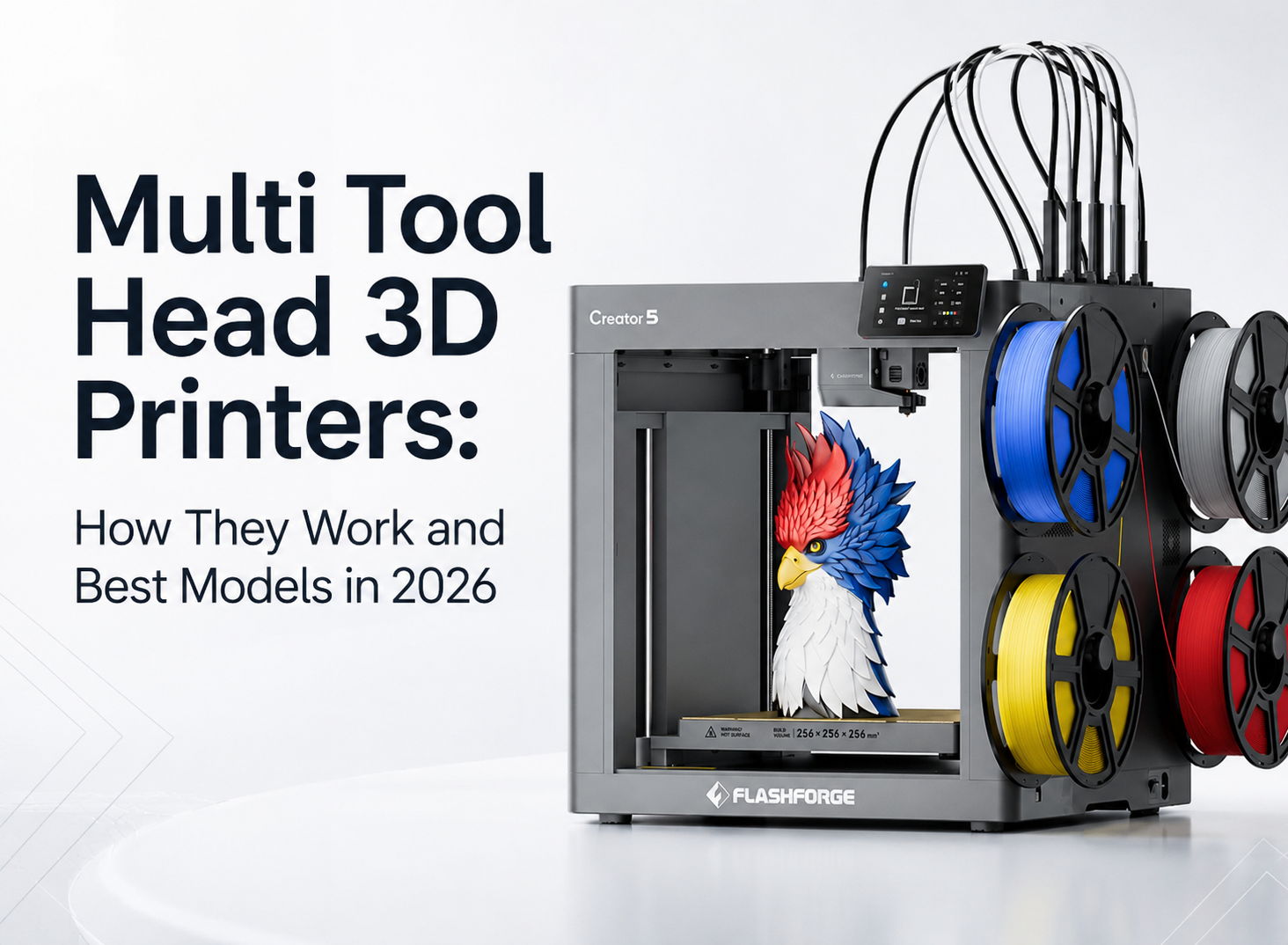
Multi-color and multi-material 3D printing often requires frequent material changes. Traditional shared-nozzle systems must repeatedly purge filament during each switch, increasing both print time and waste.
A tool-changer 3D printer uses dedicated toolheads for different materials, allowing the machine to swap tools instead of flushing a shared nozzle. This can reduce purge waste, improve efficiency, and make complex multi-material projects easier to manage.
In this guide, you'll learn how tool-changer 3D printers work, their advantages and limitations, how they reduce waste, and which models are worth considering in 2026.
What Is a Tool Changer 3D Printer?
A tool-changer 3D printer takes a different approach to multi-material printing by using several independent toolheads within a single machine.
Each toolhead has its own filament path, nozzle, and hotend configuration. As the print progresses, the printer automatically selects the toolhead required for the next color or material.
This is different from a shared-nozzle system, where multiple filaments must pass through the same melt zone before reaching the model.
The Basic Concept of Tool-Changing Technology
Each toolhead remains parked in a dedicated docking station until it is needed for the next stage of the print.
When the print requires another color or material, the carriage returns the current toolhead to its dock, releases it, and picks up the required one. The newly selected nozzle then continues printing from the correct position.
Each toolhead can serve a different purpose. One may print a PLA body. Another may add a contrasting color. A third may print a flexible TPU section. A fourth may handle a soluble or easy-release support material.
Because each toolhead keeps its own filament ready, the printer avoids repeated unloading, loading, and flushing through a shared nozzle.

How Tool Changers Differ from Multi-Extruder Systems
Tool changers are one category within the wider multi-extrusion market.
A fixed dual-extruder printer carries two nozzles on the same moving assembly. An IDEX printer uses two independently controlled extruders. A shared-nozzle multi-material system feeds several filaments through one nozzle. A tool changer parks inactive toolheads and retrieves them only when needed.
The Flashforge guide to dual-extruder 3D printers and multi-extrusion systems explains how these structures fit different printing needs.
A fixed dual-extruder or IDEX machine can work well for two-material projects. A tool changer becomes more useful when a design requires three or four materials, frequent color transitions, or separate support interfaces.
Common Applications
Tool-changer 3D printers are useful when a project needs more than a single filament.
For creative projects, separate toolheads can print signs, toys, figurines, teaching models, decorative parts, and personalized products with cleaner color transitions.
For functional prototypes, separate nozzles can combine different material properties. A rigid housing may include a flexible grip. A product sample may use a dedicated support interface to improve the underside of an overhang.
Tool changers also suit studios and small-batch workflows. When a model requires frequent transitions, reducing material changes and purge waste can improve production efficiency.
How Does a Tool Changer 3D Printer Work?
The tool-changing process depends on three systems working together: the docking mechanism, the slicer, and toolhead calibration.
The slicer decides when each material should be used. The printer then performs each swap while keeping every nozzle aligned to the same coordinate system.
Tool Docking and Switching Mechanism
Inactive toolheads remain parked in dedicated docks.
When the printer reaches a planned transition, the carriage returns the active toolhead and retrieves the next one. The locking mechanism must keep each tool stable while allowing repeatable swaps throughout a long print.
This structure also reduces moving mass. The carriage does not need to carry every toolhead across the build area at the same time.
Software and Slicer Workflow
The slicer controls material assignment and tool changes.
Before slicing, the operator assigns colors or materials to selected areas of the model. The software then creates a toolpath that tells the printer when to switch tools.
A practical slicer should preview tool assignments, support structures, prime towers, and estimated filament use before printing begins.
The Flashforge Creator 5 Series supports Orca-Flashforge and OrcaSlicer, allowing makers and production teams to prepare multi-color and multi-material models within a familiar workflow.
What Happens During a Tool Change?
A tool change involves several short steps.
The carriage moves to the docking area, parks the active toolhead, locks onto the next one, and returns to the model. The printer then continues with the assigned material.
Unlike a shared-nozzle system, the printer does not need to flush the previous color from the same melt zone. This reduces discarded filament during frequent transitions.
A small prime tower may still be used when the slicer needs to stabilize flow. This is why “zero purge waste during material switching” is more accurate than claiming that every print produces no waste at all.
Pros and Cons of Tool Changer 3D Printers
Tool changers solve several important problems, but they also introduce additional hardware and calibration requirements.
The right choice depends on how often you print with several materials and whether the time and filament savings justify the initial investment.
What Are the Advantages of Tool Changer 3D Printers?
Less Waste and Lower Printing Costs
A shared-nozzle system must purge the previous material before the next color can print cleanly. A tool changer keeps each filament inside its assigned nozzle, reducing waste during complex multi-color projects.
The difference becomes more noticeable as the number of swaps increases. A simple logo may require only a few transitions. A detailed figurine or teaching model may require hundreds.
Better Multi-Material Print Quality
Separate nozzles reduce color contamination.
When a shared nozzle changes from a dark filament to a light one, residual material can affect the next section. Dedicated toolheads keep the materials separated and support cleaner transitions.
More Flexibility for Complex Designs
Different toolheads can carry separate colors, materials, or nozzle sizes.
A model may combine PLA with TPU, use PETG as an easy-release support for PLA, or assign a soluble support filament to complex geometry.
Material combinations still need testing. Two filaments can print well individually but fail to bond reliably when used in the same part.
Increased Productivity and Automation
Tool changers reduce repeated manual work.
Once the materials are loaded and assigned in the slicer, the printer can complete a complex model without requiring the operator to change filament by hand.
This matters for studios, product teams, and small print farms. The Flashforge guide to prototyping with fast 3D printers explains how independent toolheads can reduce waste, rework, and delays during repeated design iterations.
What Are the Drawbacks of Tool Changer 3D Printers?
Mechanical Complexity and Maintenance
A tool changer has more components than a basic single-extruder printer.
The docks, locking mechanism, nozzles, filament paths, and calibration system all need to work together. Operators should keep the toolheads clean and inspect the docking area during routine maintenance.
Tool Alignment and Calibration Accuracy
Every nozzle must return to the same coordinate system.
A small X, Y, or Z offset can create visible shifts, rough surfaces, or weak connections between materials. Automatic calibration reduces manual work, but the printer may still need recalibration after selected maintenance tasks or nozzle collisions.
Higher Upfront Cost
Tool changers usually cost more than basic single-color printers.
However, the purchase price is only one part of the decision. Filament waste, post-processing time, manual intervention, and the number of machines required for different workflows also affect long-term value.Why Tool Changer 3D Printing Creates Less Waste
The waste reduction comes from the nozzle structure.
A shared-nozzle system must clear residual filament from one melt zone. A tool changer avoids that repeated flushing step because each material remains inside a dedicated toolhead.
The Problem with Traditional Filament Purging
A shared-nozzle multi-material printer must remove the previous color before the next one reaches the model.
The printer may deposit unwanted material into a purge tower, waste chute, or sacrificial structure. This helps preserve color quality but consumes additional filament.
The amount of waste depends on the model, color sequence, number of swaps, and slicer settings. A complex print with frequent transitions can use a significant amount of material that never becomes part of the final model.
How Tool Changers Reduce Material Waste
A tool changer keeps each filament loaded in its assigned nozzle.
When the project changes materials, the printer swaps toolheads instead of flushing the previous filament from a shared hotend. This removes the main source of purge waste during transitions.
Flashforge describes the FlashSwap system as providing zero purge waste during material switching. In practical workflows, a small prime structure may still be used when needed to stabilize extrusion.
The key difference is scale. Tool changing can substantially reduce the material discarded during repeated color changes.
Cost and Sustainability Benefits
Lower waste improves both cost control and workflow efficiency.
This matters when a project uses expensive engineering filaments, soluble supports, or frequent color transitions. Choosing the right 3d printer filament also matters because material price, compatibility, drying requirements, and the number of tool changes can all affect the final cost of a project.
Less discarded material also means fewer purge structures to remove after printing.
The environmental benefit depends on the complete workflow, including energy use, filament type, print success rate, and whether failed parts can be recycled. Tool changing does not make 3D printing waste-free, but it reduces one of the most visible sources of unnecessary material use.

Which Tool Changer 3D Printer Is Right for You in 2026?
The best 3d printer for a tool-changing workflow depends on budget, materials, build size, and how much hands-on setup you want to manage.
When browsing a 3d printer for sale, compare more than the purchase price. Toolhead count, calibration, material support, enclosure design, build volume, and long-term filament use all affect the value of the machine.
A desktop maker may prioritize a lower entry price. A studio may need active chamber heating for engineering filaments. A larger workshop may need additional build volume or more room for expansion.
Flashforge Creator 5
The Flashforge Creator 5 is a value-focused desktop tool changer that keeps multi-material printing easy to manage. Four independent FlashSwap toolheads reduce purge waste, while automatic leveling and fully automatic multi-toolhead offset calibration reduce manual setup.
Remote monitoring and multi-printer management also make longer jobs and small production workflows easier to manage without adding unnecessary hands-on work.
Key Advantages: Four independent toolheads, automatic calibration and leveling, reduced purge waste, and remote printer management.
Best For: Makers, schools, personalized products, creative studios, and small print farms that want an accessible four-toolhead workflow.
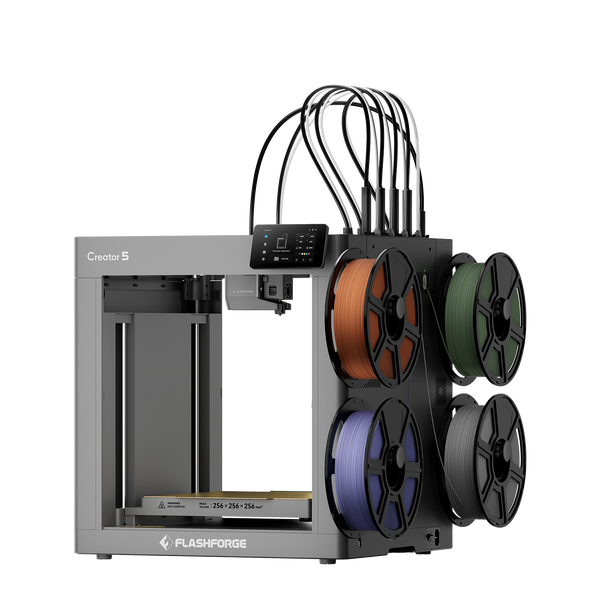
Flashforge Creator 5 4-Toolheads Multi-Color 3D Printer | 500% Faster, Zero Purge Waste
Flashforge Creator 5 Pro
The Flashforge Creator 5 Pro keeps the same streamlined operating workflow while adding a fully enclosed frame and active chamber heating up to 65°C. Automatic calibration and leveling simplify setup, while the enclosed design expands support for engineering filaments.
HEPA and activated carbon filtration, continuous airflow control, and door detection make the machine more practical for professional workspaces.
Key Advantages: Four independent toolheads, automatic calibration and leveling, heated chamber, filtration, and broader engineering-material support.
Best For: Product-development teams, design studios, print-service providers, and professional users who need a controlled workflow without excessive manual adjustment.
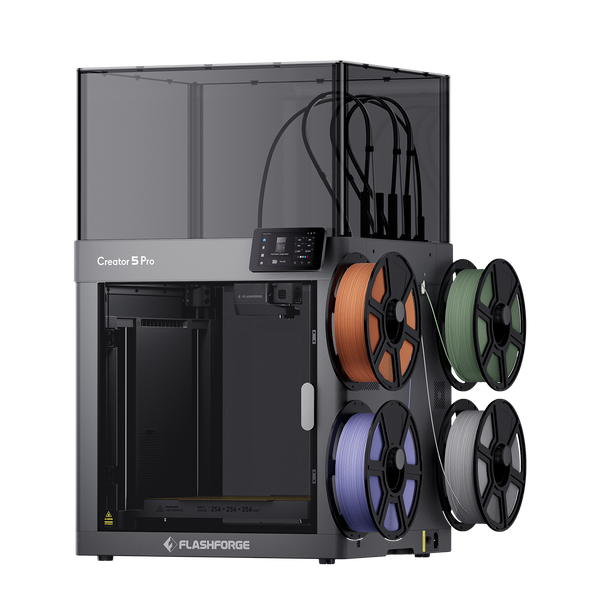
Flashforge Creator 5 Pro 4-Toolheads Enclosed Multi-Color 3D Printer | 500% Faster, Zero Purge Waste
Snapmaker U1
The Snapmaker U1 is a compact four-toolhead printer with automatic filament loading and a 270 × 270 × 270 mm build volume. Its fast tool-changing system helps simplify multi-color and multi-material printing for desktop users.
Key Advantages: Automatic filament loading, fast tool swaps, and a compact desktop format.
Best For: Hobbyists and makers who prioritize convenience and multi-color printing.
Prusa XL
The Original Prusa XL is a larger and more expandable platform with a 360 × 360 × 360 mm build volume and support for up to five toolheads.
Key Advantages: Larger build area, expandable toolhead options, and an optional enclosure.
Best For: Advanced makers, workshops, larger parts, and buyers who need additional room for expansion.
Quick Comparison Table
| Model | Toolheads | Build Volume | Max Speed | Enclosure | Chamber Heating | Retail Price | Current Market Price | Best For |
| Flashforge Creator 5 | 4 | 256 × 256 × 256 mm | 300 mm/s print speed; 600 mm/s travel speed | Open frame | No | $799 | $699 after cart discount | Accessible desktop multi-color and multi-material printing |
| Flashforge Creator 5 Pro | 4 | 256 × 256 × 256 mm | 300 mm/s print speed; 600 mm/s travel speed | Fully enclosed | Up to 65°C | $949 | $849 after cart discount | Engineering filaments and professional desktop workflows |
| Snapmaker U1 | 4 | 270 × 270 × 270 mm | Up to 500 mm/s | Optional top cover | No active heating listed | $999 | $849 | Automatic filament loading and compact multi-color printing |
| Original Prusa XL | Up to 5 | 360 × 360 × 360 mm | No single maximum-speed figure published | Optional enclosure | No active heating listed | From $2,128.70 | $3,610.18 for the 5-toolhead configuration | Larger builds and expandable setups |
The Creator 5 delivers one of the strongest value propositions in desktop tool-changing 3D printing. It combines four independent toolheads, automatic leveling, multi-toolhead calibration, and remote management at a significantly lower entry cost than many expandable alternatives.
The Creator 5 Pro adds chamber heating, filtration, and broader engineering-material support without changing the core operating workflow. Snapmaker U1 is better suited to users who prioritize automatic filament loading, while Prusa XL fits buyers who need a larger build area and more expansion options.
Conclusion
A tool changer 3D printer improves multi-color and multi-material printing by using independent toolheads instead of repeatedly switching filaments through a shared nozzle. This reduces purge waste, improves material transitions, and streamlines complex workflows.
When choosing a tool changer printer, consider toolhead count, material support, build volume, and automation. Creator 5 offers four toolheads with automatic calibration and remote management, while Creator 5 Pro adds an enclosed heated chamber for engineering materials. Snapmaker U1 focuses on convenience, and Prusa XL provides a larger, more expandable platform.
FAQ
What Is the Difference Between a Tool Changer and a Multi-Material System?
A multi-material system is a broad category.
Some systems feed several filaments through one shared nozzle. A tool changer uses separate toolheads and parks inactive tools when they are not needed.
The tool-changing structure reduces purge waste and shortens transitions because each material stays inside its assigned nozzle.
Are Tool Changer 3D Printers Worth It for Hobbyists?
They can be.
A hobbyist who mainly prints single-color PLA models may not need a tool changer. A simpler printer may offer better value.
A tool changer becomes more useful when multi-color models, TPU projects, support materials, or personalized products are a regular part of the workflow.
What Materials Can Be Used with a Tool Changer Printer?
Material support depends on the printer, nozzle, enclosure, and chamber conditions.
Common options include PLA, PETG, TPU, PVA, and selected composite filaments. Enclosed printers with active chamber heating can support more demanding materials such as ABS, ASA, PC, PA, and selected fiber-reinforced filaments.
Check the printer compatibility list and the filament supplier's profile before combining materials in one print.