Choosing the right FDM 3D printer depends on more than price or advertised speed. Beginners may prioritize simple setup and reliable first layers, while studios may need broader material support, multi-color printing, a larger build volume, or repeatable production.
FDM, short for fused deposition modeling, melts thermoplastic filament and builds parts layer by layer. It is widely used for home projects, classroom models, functional prototypes, workshop parts, and small-batch production.
This guide compares suitable FDM printers by use case and explains which specifications matter most in daily printing.
Quick Answer: Best FDM 3D Printer by Use Case
| Model | Best For | Build Volume | Printer Design | Key Features | Current Price |
| Flashforge Adventurer 5M Pro | Best overall | 220 × 220 × 220 mm | Enclosed CoreXY | Automatic leveling, quick-detach nozzle, camera, filtration | $369.00 |
| Flashforge Adventurer 5M | Beginners | 220 × 220 × 220 mm | Open-frame CoreXY | Easy setup, automatic leveling, quick-detach nozzle | $249.00 |
| Flashforge AD5X | Multi-color printing | 220 × 220 × 220 mm | Shared-nozzle IFS system | Four-color printing, automatic filament loading | $349.00 |
| Flashforge Creator 5 | Multi-material printing | 256 × 256 × 256 mm | Open frame, four toolheads | Independent toolheads, low purge waste, automatic calibration | $699.00 |
| Flashforge Creator 5 Pro | Engineering materials | 256 × 256 × 256 mm | Enclosed, four toolheads | Active 65°C chamber heating, filtration | $1,917.00 |
| Flashforge Guider 3 Ultra | Large-format printing | Up to 330 × 330 × 600 mm | Large-format CoreXY | Dual extruders, soluble supports, automatic leveling | $3,999.00 |
How Printer Design Affects Quality, Speed, and Cost
Two printers with similar advertised speeds may perform very differently in real use. Flashforge’s guide on how to choose the best FDM 3D printer provides a broader buying framework, but the main hardware factors are motion stability, extrusion, cooling, enclosure design, and calibration.
Motion System and Frame Stability Impact Print Quality
A rigid frame helps the printer maintain accuracy as the toolhead changes direction. CoreXY printers move the toolhead across the XY plane while the build plate generally moves along the Z-axis, avoiding the repeated movement of a heavy bed found in many bed-slinger designs.
However, CoreXY motion alone does not guarantee better quality. Belt tension, frame rigidity, vibration compensation, acceleration settings, and slicer profiles still affect ringing, ghosting, and surface finish.
Extrusion and Cooling Affect Print Speed
Maximum motion speed does not show how quickly a printer can produce a finished part. The hot end must melt enough filament to maintain the required flow, while the cooling system must solidify each layer without weakening layer adhesion.
PLA typically needs more cooling than PETG, while large nozzles and thick layers require greater extrusion flow. When comparing a high-speed FDM 3D printer, evaluate print speed, travel speed, acceleration, flow rate, cooling, and motion stability together.
Enclosure and Temperature Control Expand Material Options
Open-frame printers are accessible and work well for PLA, PETG, and TPU in stable indoor environments. Enclosed machines reduce drafts and help maintain a more consistent temperature around the part, which becomes more important when printing ABS, ASA, PC, PA, and similar materials.
An enclosure can also reduce direct contact with moving components and contain some noise and emissions. It should still be combined with suitable filtration or room ventilation when used in classrooms, studios, or shared spaces. NIOSH identifies ventilation and enclosed or filtered controls as important ways to reduce exposure from 3D printing.
Auto Calibration Improves Stability and Reduces Maintenance
Automatic bed leveling reduces the manual setup needed to achieve a consistent first layer. More advanced systems may also provide vibration compensation, flow calibration, filament detection, power-loss recovery, or automatic toolhead offset calibration.
These features do not remove the need for maintenance, but they make repeated printing more predictable for beginners, schools, studios, and multi-printer environments.
Best FDM 3D Printers Explained
Best Overall FDM 3D Printer
The Flashforge Adventurer 5M Pro is a balanced choice for homes, classrooms, and small studios. It combines a 220 × 220 × 220 mm build volume with an enclosed CoreXY structure, automatic leveling, quick-detach nozzles, camera monitoring, and HEPA plus activated-carbon filtration. Its enclosure provides better protection from drafts than an open-frame printer without moving into a larger professional system.
Best FDM 3D Printer for Beginners
The Flashforge Adventurer 5M is a practical first printer for users who want simple setup and maintenance. It offers a 220 × 220 × 220 mm build volume, automatic leveling, quick-detach nozzles, and an all-metal CoreXY structure. Its open design is well suited to PLA, PETG, TPU, and common desktop projects, while users planning regular ABS or ASA printing should consider an enclosed model.
Best Multi-Color FDM 3D Printer
The Flashforge AD5X uses an integrated IFS to load and switch between up to four filaments through one shared nozzle. It is suitable for toys, decorations, signs, educational models, and personalized products. The AD5X provides a 220 × 220 × 220 mm build volume, a maximum print speed of 300 mm/s, a 600 mm/s maximum movement speed, and automatic filament loading. Shared-nozzle color changes may still add purge waste and switching time.
Best Multi-Material FDM 3D Printer
The Flashforge Creator 5 uses four independent FlashSwap toolheads, allowing compatible colors, rigid filaments, flexible filaments, and support materials to remain loaded separately. This reduces repeated unloading and purge-related waste compared with shared-nozzle systems. It offers a 256 × 256 × 256 mm build volume, automatic toolhead offset calibration, a 320°C nozzle, and up to 300 mm/s print speed.
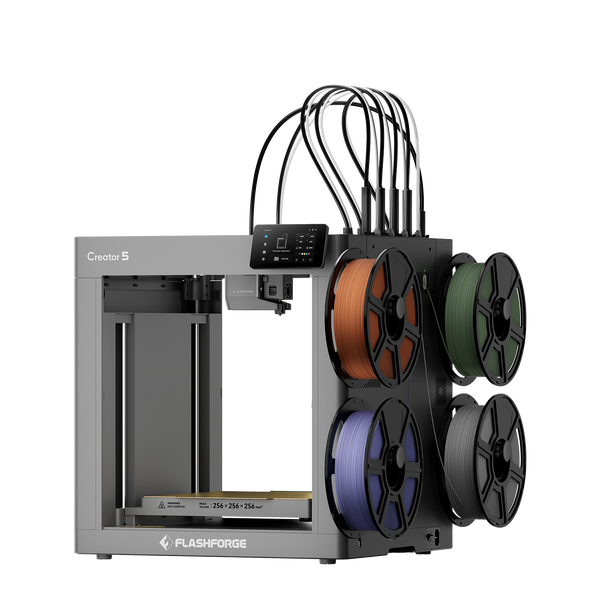
Flashforge Creator 5 4-Toolheads Multi-Color 3D Printer | 500% Faster, Zero Purge Waste
Best FDM 3D Printer for Engineering Materials
The Flashforge Creator 5 Pro is built for professional multi-material prototyping and engineering-filament workflows. Its four independent FlashSwap toolheads can keep model materials, support materials, or different colors ready at the same time, reducing material-switching delays and eliminating the need for a purge tower during tool changes.
The fully enclosed rigid frame and actively heated chamber, which reaches up to 65°C, provide a more controlled environment for materials that are sensitive to temperature changes. With a maximum nozzle temperature of 320°C and a heated bed reaching 120°C, the printer supports ABS, ASA, PA-CF, PET-CF, PAHT-CF, PPA-CF, PPS-CF, PVA, BVOH, and other professional materials.
Its 256 × 256 × 256 mm build volume is suited to professional desktop prototypes, jigs, fixtures, support-intensive models, and small-batch functional parts. Automatic leveling, multi-toolhead calibration, dynamic flow compensation, remote monitoring, and integrated HEPA13 plus activated-carbon filtration help improve repeatability in studios, laboratories, and engineering workplaces.
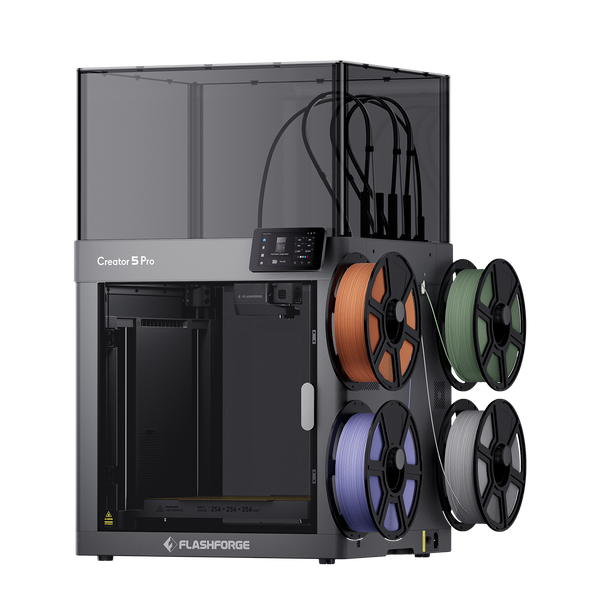
Flashforge Creator 5 Pro 4-Toolheads Enclosed Multi-Color 3D Printer | 500% Faster, Zero Purge Waste
FDM 3D Printer Comparison Table
| Model | Main Strength | Multi-Color or Multi-Material System | Enclosure | Suitable Users |
| Adventurer 5M Pro | Balanced enclosed workflow | Single toolhead | Yes | Homes, classrooms, studios |
| Adventurer 5M | Beginner-friendly operation | Single toolhead | No | Beginners and hobbyists |
| AD5X | Accessible four-color printing | Shared-nozzle IFS | Optional enclosure | Creative users and small farms |
| Creator 5 | Low-waste multi-tool workflow | Four independent toolheads | No | Makers and design studios |
| Creator 5 Pro | Controlled engineering printing | Four independent toolheads | Yes, actively heated | Engineers and professional users |
| Guider 3 Ultra | Large-format dual extrusion | Dual extruders | Yes | Prototyping and large parts |
Practical Tips Before Buying an FDM 3D Printer
Choosing the best 3D printer starts with the models and materials you plan to use, rather than the longest specification list.
Test Your Typical Models in Slicer Software
Import several common models into slicing software and check whether they fit the build volume, how much support they require, and how long they may take to print. This helps determine whether a 220 mm desktop printer is enough or whether a larger machine is justified.Material choice also affects hardware requirements. Flashforge’s 3D printer filament types guide compares common materials such as PLA, PETG, TPU, ABS, ASA, PA, and support filaments.
Estimate the Full Cost Beyond the Printer Price
Calculate the total cost by adding filament, spare nozzles, build plates, drying equipment, electricity, maintenance, failed prints, and operator time to the machine price.Multi-color shared-nozzle systems may use additional filament during color changes, while independent-toolhead systems may require more calibration and component maintenance. When comparing a 3D printer for sale, make sure the discounted model still matches your materials, build volume, and long-term workflow.
Check Workspace, Software, and Long-Term Support
Consider the printer’s physical dimensions, operating clearance, noise, ventilation, and maintenance access. Homes and classrooms may benefit from enclosed printers and filtration, while studios and print farms may prioritize remote monitoring and multi-device management.Also confirm slicer compatibility and replacement-part availability. Flash Studio Desktop, formerly Orca-Flashforge, supports current Flashforge workflows, although exact software compatibility depends on the printer model.
Common FDM 3D Printer Buying Mistakes to Avoid
Many poor printer choices result from focusing on one headline feature instead of the complete workflow.

Focusing Only on Speed and Ignoring Real Performance
Maximum speed does not equal normal print speed. Actual performance depends on acceleration, extrusion flow, cooling, material, model geometry, and slicer settings. Travel speed should also not be presented as sustained printing speed.
Paying for Multi-Color or Engineering Features You Rarely Use
Multi-color and engineering-material features are valuable only when your projects require them. A single-color PLA workflow may not benefit enough from four toolheads or an actively heated chamber to justify the additional complexity.
Choosing the Wrong Print Size
A printer that is too small may require models to be divided and assembled. A machine that is much larger than necessary can occupy more space and increase purchase and maintenance costs. Check several real model dimensions before deciding.
Ignoring Software, Maintenance, and Part Availability
Automatic leveling, quick-detach nozzles, clear material profiles, remote monitoring, and available replacement parts can matter as much as hardware specifications. Poor maintenance access can create unnecessary downtime for regular users.
Conclusion
The best FDM 3D printer is the one that matches the materials, part sizes, and production workflow of the user. Adventurer 5M and 5M Pro cover beginner and everyday printing, while AD5X focuses on accessible four-color projects. Creator 5 serves creative multi-toolhead workflows, and Creator 5 Pro is the stronger option when professional users need four independent toolheads, engineering-material compatibility, active chamber heating, and repeatable multi-material production.
FAQ
Is an FDM 3D Printer Better Than a Resin or SLA 3D Printer?
FDM is generally better for larger parts, functional prototypes, household objects, fixtures, and lower-mess workflows. Resin or SLA printing is better for miniatures, jewelry prototypes, and models that require very fine details and smoother surfaces.
What Software Do You Need for an FDM 3D Printer?
You need slicer software to convert a 3D model into printable toolpaths. The slicer controls layer height, walls, infill, supports, temperature, cooling, and speed. Software compatibility varies by printer model.
What Nozzle Size Is Best for FDM 3D Printing?
A 0.4 mm nozzle is the most versatile option because it balances detail, print time, and filament flow. A 0.25 mm nozzle suits smaller details, while 0.6 mm and 0.8 mm nozzles can reduce print time on larger parts.
Do FDM 3D Printers Need Ventilation?
Yes. Suitable ventilation is recommended, particularly in classrooms, offices, studios, and enclosed rooms. Enclosures and filters can help manage the printing environment but should not automatically be treated as a complete replacement for ventilation.
How Often Does an FDM 3D Printer Need Maintenance?
Maintenance depends on printing frequency and material type. Common tasks include cleaning the build plate, inspecting the nozzle, removing filament debris, checking belts and fans, updating software, and keeping filament dry.
Can an FDM 3D Printer Run Overnight?
Long prints may continue overnight, but unattended printing should not be considered risk-free. Use a stable surface, maintain sufficient clearance and ventilation, and keep the printer in good condition. Runout detection, power-loss recovery, and remote monitoring can support supervision but do not eliminate operating risks.