PLA does not have one fixed temperature for every stage of printing. Its melting point, glass transition temperature, nozzle temperature, and bed temperature each affect flow, layer bonding, surface quality, and heat resistance. Understanding these differences helps you choose the right settings for standard PLA, PLA+, and high-speed PLA while avoiding weak layers, stringing, warping, or loss of detail.
What Is the Melting Point of PLA?
Understanding PLA temperature starts with separating the material’s physical transitions from the settings used by a 3D printer.
PLA Melting Point vs Printing Temperature
The melting point is the range in which solid PLA becomes molten. Printing temperature is the nozzle setting required to melt and deposit filament at a controlled rate. PLA may melt below 180°C but still needs a 200°C nozzle because it spends only a short time inside the hotend and must flow through a narrow opening.
The Actual Melting Point of PLA
Most PLA grades melt at roughly 150°C to 180°C. The exact value depends on molecular structure, crystallinity, and additives, so it is more accurate to use a range than one universal number. Experimental studies have reported melting or softening values near 153°C for some PLA formulations and melting points between 170°C and 180°C for others.
PLA Melting Point vs Glass Transition Temperature
PLA’s glass transition temperature is usually around 55°C to 65°C. Above this range, a printed part can soften and lose stiffness long before it melts. This is why a PLA mount may bend in a hot car without becoming liquid.

How PLA Melting Point Affects 3D Printing Quality
The way PLA softens and flows directly affects extrusion, interlayer bonding, surface finish, and dimensional accuracy.
How Melting Affects Filament Flow
Hotter PLA generally flows more easily. If the temperature is too low for the requested extrusion rate, the print may show gaps, thin walls, rough lines, or extruder clicking. Larger nozzles, wider lines, thick layers, and faster speeds increase the amount of plastic that must be melted each second.
How Temperature Affects Layer Adhesion and Print Strength
Freshly deposited PLA must remain warm enough to bond with the previous layer. Printing too cold can produce parts that look acceptable but split along layer lines. Raising the temperature can improve bonding, although orientation, cooling, wall count, and flow also affect strength.
How Temperature Affects Surface Finish and Fine Details
Lower temperatures can reduce oozing and keep small corners sharp. Higher settings may improve flow and gloss but can soften bridges, round fine text, or increase stringing. Use the lowest temperature that still provides consistent extrusion and adequate layer bonding.
What Happens When PLA Gets Too Hot?
Excessive heat can cause strings, blobs, sagging overhangs, rough top layers, discoloration, or a burnt smell. Before lowering the temperature, check whether weak cooling, incorrect retraction, or excessive flow is contributing to the problem.
What Temperature Should You Use for PLA Printing?
A practical PLA temperature should match the filament formula, nozzle size, print speed, build surface, and hotend performance.
Printing Temperatures for Standard PLA, PLA+, and High-Speed PLA
Use the spool label or a tested slicer profile first. PLA+ formulations vary by manufacturer, and high-speed PLA may need more heat as volumetric flow rises.
| PLA type | Suggested nozzle temperature | Suggested bed temperature |
| Standard PLA | 190°C–220°C | 40°C–60°C |
| PLA+ | 200°C–230°C | 50°C–65°C |
| High-speed PLA | 210°C–240°C at high speed | 50°C–65°C |
These are starting ranges, not fixed limits. Flashforge HS PLA lists a nozzle range of 190°C to 240°C and states that higher speeds require higher temperatures. A slow detail print may therefore use the lower end, while a high-flow model may need the upper end.
Printer flow capacity also affects temperature. The Flashforge Creator 5 provides a maximum flow rate of 32 mm³/s, a maximum print speed of 300 mm/s, automatic PA calibration, and 0.25, 0.4, 0.6, and 0.8 mm nozzle options. It supports PLA, Silk, and PLA-CF, making it suitable for detailed, general, and higher-flow PLA printing.
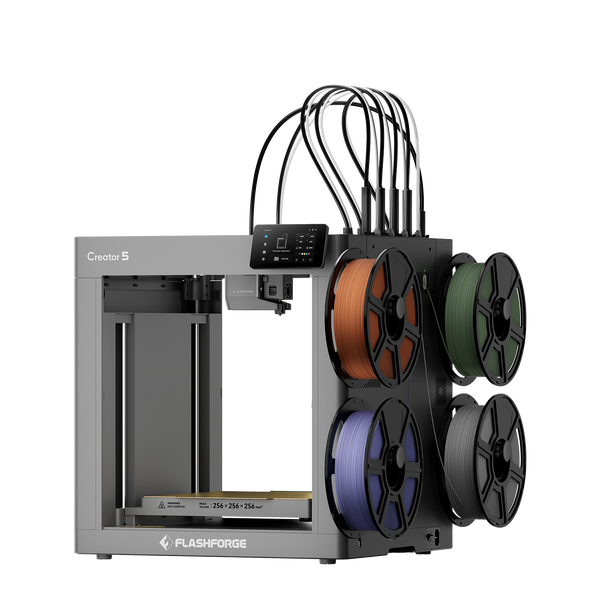
Flashforge Creator 5 4-Toolheads Multi-Color 3D Printer | 500% Faster, Zero Purge Waste
The Creator 5 Pro keeps the same 256 × 256 × 256 mm build volume and nozzle options while adding a fully enclosed frame, auxiliary cooling, and active chamber heating up to 65°C. It is more suitable for users who also plan to print ABS, ASA, PC, PA, or reinforced engineering materials. For PLA, its cooling mode helps control enclosure temperature rather than adding chamber heat.
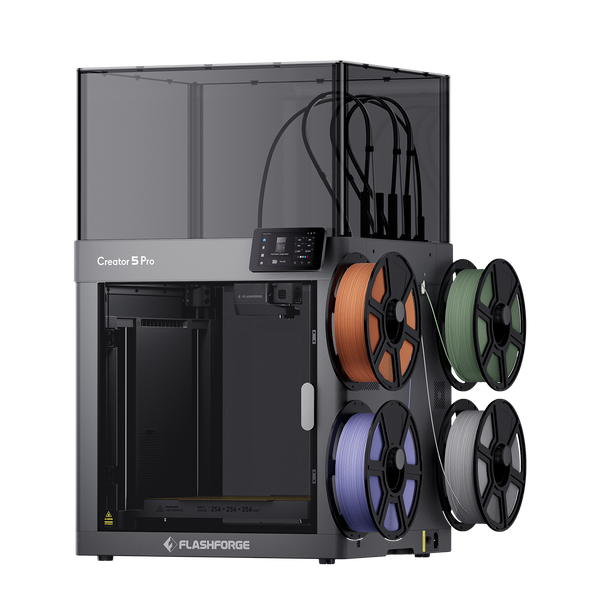
Flashforge Creator 5 Pro 4-Toolheads Enclosed Multi-Color 3D Printer | 500% Faster, Zero Purge Waste
When comparing a 3d printer for sale, do not judge PLA performance by maximum nozzle temperature alone. Check the available filament profiles, nozzle options, cooling system, flow capacity, and calibration features, since these factors determine whether the printer can maintain stable extrusion at the temperature and speed you intend to use.
Recommended PLA Bed Temperature
PLA can often use a bed between 40°C and 60°C, but 50°C to 55°C is a better starting range on a clean PEI plate.
-
Use 50°C for small parts and stable rooms.
-
Use 55°C for most everyday PLA prints.
-
Use 60°C for larger footprints, cool rooms, or lifting corners.
-
Use 65°C only when the filament profile permits it and lower settings fail.
The standard range describes what PLA may tolerate; the recommended range is what most users should test first. If the bottom edge spreads outward or stays soft, lower the bed by 5°C. Flashforge’s PLA bed temperature guide explains how PEI, glass, textured plates, and adhesives change the result.
First-Layer Temperature vs Later-Layer Temperature
The first layer can use a nozzle setting about 5°C higher than later layers, with the part-cooling fan off or low. After the base is secure, return to the normal nozzle temperature and increase cooling. Extra heat should not be used to hide a dirty plate, incorrect Z offset, or excessive first-layer speed.
Factors That Affect the Best PLA Printing Temperature
Published ranges provide a useful baseline, but material, hardware, slicer settings, and room conditions determine the final value.
PLA Brand, Colour, and Additives
Pigments, impact modifiers, silk additives, carbon fiber, and mineral fillers change viscosity and heat transfer. Recheck the temperature when changing color or PLA type, even when both spools come from the same manufacturer.
Filament Moisture and Storage
Wet PLA may hiss, pop, string, or create rough surfaces. Store opened filament in a sealed container with desiccant and follow its drying instructions. Flashforge recommends a low-humidity storage environment for HS PLA and sealing the spool with desiccant.
Nozzle Size and Hotend Performance
A 0.6 or 0.8 mm nozzle can deposit more material, but the hotend must melt it fast enough. A 0.25 mm nozzle supports finer details but normally requires slower printing. The best 3d printer for your PLA projects should therefore provide suitable nozzle options, stable temperature control, and enough flow capacity for the detail level and printing speed you need. Flashforge’s article on how 3D printer nozzle size affects your prints explains the trade-off between detail, speed, layer height, and flow.
Print Speed, Layer Height, and Flow Rate
Temperature should follow volumetric flow rather than headline speed alone. When using a high speed 3d printer, faster movement, thicker layers, wider lines, or a larger nozzle may require more heat to maintain consistent extrusion. If under-extrusion appears only during fast or high-flow sections, raise the nozzle temperature gradually or reduce line width, layer height, or print speed.
Cooling and Room Temperature
PLA generally benefits from cooling after the first layers. Strong airflow improves bridges and details but can weaken bonding if it removes heat too quickly. Keep the printer away from cold drafts, open windows, and direct air-conditioning airflow.
How to Tell If Your PLA Printing Temperature Is Too High or Too Low
Print defects offer useful clues, but temperature must be separated from moisture, flow, cooling, and first-layer calibration problems.
Signs Your PLA Printing Temperature Is Too Low
Typical signs include poor layer adhesion, wall gaps, rough extrusion, extruder clicking, and under-extrusion that worsens at higher speed. Increase the temperature by 5°C steps. If the filament is already near its upper limit, reduce flow demand instead. Flashforge also recommends checking that the selected temperature matches the range printed on the filament packaging.
Signs Your PLA Printing Temperature Is Too High
Look for heavy stringing, glossy blobs, sagging bridges, rounded corners, lost detail, discoloration, or continuous oozing. Lower the temperature by 5°C, then check retraction, cooling, travel paths, and flow calibration if the defect remains.
How to Separate Temperature Problems From Wet Filament or Incorrect Settings
Wet filament often causes popping, bubbles, and random roughness across several temperatures. Incorrect flow creates repeating dimensional errors, poor cooling mainly affects bridges, and a bad Z offset is concentrated in the first layer. Identify where the defect appears before changing several settings.
How to Use a Temperature Tower to Find the Right Setting
Print a temperature tower with the same spool, nozzle, layer height, cooling, and approximate speed planned for the final model. Change only the nozzle temperature between sections. Compare stringing, bridges, overhangs, surface consistency, and layer strength, then select the lowest reliable temperature.
Conclusion
PLA printing becomes easier to tune once melting point, glass transition temperature, nozzle temperature, and bed temperature are treated as separate values.
PLA commonly melts around 150°C to 180°C, while practical nozzle settings usually fall between 190°C and 240°C. Start with the filament profile, use about 50°C to 55°C on a clean PEI bed, and adjust in 5°C steps. Match each change to nozzle size, speed, flow, cooling, and the defect being corrected.
FAQ
The following answers cover common concerns about PLA softening, heat exposure, annealing, storage, and recycling.
Can PLA Melt in Boiling Water?
Boiling water does not normally melt PLA because 100°C is below its typical melting range. It is well above the glass transition range, however, so a printed part can soften, bend, shrink, or permanently deform. (PMC)
Will PLA Prints Warp in a Hot Car or Direct Sunlight?
Yes. A hot vehicle or direct sunlight can raise the part above its glass transition range, causing sagging or dimensional change. Dark parts and objects carrying a load are especially vulnerable.
Does Annealing Improve the Heat Resistance of PLA?
Annealing can increase crystallinity and improve performance at elevated temperatures, but it can also cause shrinkage or warping. Test the process on a calibration part and measure dimensional change before treating a finished component.
How Long Does PLA Filament Last in Storage?
PLA has no universal expiration date. Filament kept cool, dry, dark, and sealed with desiccant can remain printable for a long time. Dry or replace a spool that snaps easily, bubbles during extrusion, or produces inconsistent surfaces.
Can Failed PLA Prints Be Melted and Reused?
Yes, but scraps cannot be placed directly into a standard filament printer. PLA waste must be sorted, cleaned, shredded, dried, and re-extruded into consistent filament or processed as pellets. Repeated thermal processing can change mechanical properties, so recycled material should be tested. (PMC)