For users choosing between the Adventurer 5M and Adventurer 5M Pro, raw print performance is not the main dividing line. Their core capabilities are closely matched, so the choice depends more on how the printer will be used: the 5M suits budget-conscious users working mainly with common filaments, while the 5M Pro is built around an enclosed setup with ABS and ASA support, air filtration, and built-in camera monitoring.
A home maker printing PLA organizers, toys, or quick prototypes may find the 5M more than sufficient, whereas a classroom, home office, or workshop handling ABS or ASA can benefit more from the 5M Pro’s enclosed setup. This Adventurer 5M vs Adventurer 5M Pro comparison covers print performance, material compatibility, enclosure design, and everyday use to help you choose the model that best fits your projects, workspace, and budget.
Adventurer 5M vs 5M Pro: Key Differences
When comparing the Adventurer 5M vs Adventurer 5M Pro, the core print specifications are very similar. Both offer the same build volume, maximum travel speed, acceleration, and automatic leveling, while the main differences are the enclosure, supported materials, air filtration, and built-in camera.
Quick Comparison Table
The table below highlights the specifications and features that matter most when choosing between the Adventurer 5M and 5M Pro. It also makes it easier to see which differences affect everyday printing and material compatibility.
| Feature | Adventurer 5M | Adventurer 5M Pro |
|---|---|---|
| Build Volume | 220 × 220 × 220 mm | 220 × 220 × 220 mm |
| Max Travel Speed | 600 mm/s | 600 mm/s |
| Max Acceleration | 20,000 mm/s² | 20,000 mm/s² |
| Printer Design | Open frame | Enclosed |
| Auto Leveling | Yes | Yes |
| Supported Materials | PLA, PETG, TPU, PLA-CF, PETG-CF | PLA, PETG, TPU, PLA-CF, PETG-CF, ABS, ASA |
| Air Filtration | No | HEPA + activated carbon |
| Built-in Camera | No | Yes |
| Best For | Common materials and value | Enclosed indoor printing and ABS/ASA |
At a glance, the two models are closely matched in basic print performance. The 5M Pro mainly adds a more controlled printing environment and extra features for users who need ABS/ASA support, air filtration, or built-in monitoring indoors.
Main Differences Between Adventurer 5M and 5M Pro
Open-frame access is one of the Adventurer 5M’s main advantages, especially for users who frequently remove finished parts, change nozzles, or run short PLA, PETG, and TPU jobs. By contrast, the Adventurer 5M Pro surrounds the build area with a full enclosure, giving ABS and ASA prints a more stable environment with less exposure to drafts and room-temperature changes.
Indoor use creates another clear distinction. In a home office, classroom, or shared workshop where prints may run for hours, the 5M Pro’s HEPA and activated carbon filtration and built-in camera provide added air management and easier remote monitoring.
What Adventurer 5M and 5M Pro Have in Common
The two printers share much of the same core platform, including:
- 220 × 220 × 220 mm build volume
- Maximum travel speed of 600 mm/s
- Acceleration up to 20,000 mm/s²
- One-click automatic leveling
- 0.25, 0.4, 0.6, and 0.8 mm quick-release nozzle options
This means the 5M Pro is not mainly a speed upgrade, but a model designed for users who need an enclosed printing environment and additional indoor-use features. For users who mainly print PLA, PETG, and TPU, the Adventurer 5M already covers most everyday FDM 3D printing needs.
Adventurer 5M vs 5M Pro Print Performance
The Adventurer 5M and 5M Pro are closely matched in core print performance. The Pro model does not offer a major speed or accuracy advantage, so the real differences appear more in material support and printing environment.
Print Speed and Acceleration
Both the Adventurer 5M and 5M Pro are built around the same high-speed motion platform, with a maximum travel speed of 600 mm/s and acceleration up to 20,000 mm/s². In practice, that performance is useful for rapid design iterations, such as printing several bracket or enclosure revisions during a single prototyping session.
For high-speed 3D printers, actual printing speed still varies with filament type, layer height, model geometry, and slicer settings, so the 600 mm/s figure should not be treated as the best setting for every print. For detailed models or complex geometry, slower settings may still produce better results.
Print Quality and Dimensional Accuracy
For the Adventurer 5M and 5M Pro, dimensional accuracy is another area where the two models stay closely matched, with Flashforge listing ±0.1 mm printing precision for both. That consistency matters when printing parts such as brackets, housings, or mounts that need to fit with screws, bearings, or other components.
Final dimensions still depend on material behavior, flow settings, and part orientation, so printer precision is only part of the result. A well-calibrated profile can make just as much difference when producing fitted or functional parts.
Auto Leveling and First-Layer Performance
One-click automatic leveling simplifies setup on both printers and helps create a more consistent first layer, while knowing how to level a 3D printer bed is still useful when troubleshooting Z-offset or adhesion issues. A clean PEI surface and correct temperature settings are still important for reliable adhesion.
Nozzle Options and Printing Efficiency
Both models support four quick-release nozzle sizes, allowing users to balance detail, material flow, and print efficiency:
- 0.25 mm: Fine details and smaller features
- 0.4 mm: General-purpose everyday printing
- 0.6 mm: Higher flow for TPU and carbon-fiber blends
- 0.8 mm: Faster output and larger functional parts
The right nozzle depends more on the material and project than on whether you choose the Adventurer 5M or 5M Pro.
Open Frame vs Enclosed Design
Choosing between an open-frame and enclosed 3D printer changes more than the look of the machine. It affects access, temperature stability, material choice, and the overall indoor printing experience.
Printing Environment and Accessibility
For quick part removal, nozzle changes, and routine adjustments, the Adventurer 5M’s open-frame design is easier to access. That makes it practical for frequent PLA, PETG, and TPU jobs where a fully enclosed printing environment is not essential.
By contrast, the Adventurer 5M Pro places the build area inside an enclosure. Users give up some direct access in exchange for better isolation from the surrounding room.
Temperature Control and Print Stability
Drafts and room-temperature changes can affect materials that are more prone to warping. An enclosed 3D printer such as the 5M Pro helps maintain a more consistent environment around ABS and ASA prints.
For less temperature-sensitive materials, the enclosure advantage becomes less important. PLA and PETG projects can run reliably on the open-frame 5M in a suitable printing environment, so an enclosure is not essential for many everyday jobs.
Air Filtration and Indoor Printing
In a home office, classroom, or shared workspace, managing 3D printer fumes and ventilation can matter more, making the 5M Pro’s built-in filtration and monitoring more relevant for regular indoor use. The 5M remains a practical choice for indoor printing when common filaments make up most of the workload and built-in filtration is not a priority.
What Materials Can Adventurer 5M and 5M Pro Print
Material support is another key difference between the Adventurer 5M and 5M Pro. The 5M focuses on common everyday filaments, while the 5M Pro adds materials that benefit more from an enclosed printing environment.

Materials Supported by Adventurer 5M
The Adventurer 5M is commonly used for models, home accessories, and rapid prototypes, where PLA remains the main material. To take better advantage of high-speed printing, Flashforge HS PLA Filament is better suited than standard PLA because its higher flow supports faster output, making it useful for repeated design revisions and prototype testing.
The 5M also supports PETG, TPU, PLA-CF, and PETG-CF, giving users more flexibility for everyday and functional parts. That range covers most common projects without requiring the enclosed structure of the Pro model.
Materials Supported by Adventurer 5M Pro
For outdoor housings, functional parts, or projects that need long-term weather resistance, material choice matters more. Flashforge ASA Filament offers strong UV and weather resistance, while its greater sensitivity to drafts and temperature changes makes the enclosed 5M Pro more suitable for this type of ASA printing than the open-frame 5M.
Along with the materials supported by the 5M, the 5M Pro also supports ABS and ASA. This broader material compatibility is one of the main reasons to choose the Pro for more demanding functional projects.
Nozzle Requirements for Different Materials
Both printers support 0.25, 0.4, 0.6, and 0.8 mm quick-release nozzles. The 0.4 mm nozzle works well for general printing, while 0.6 or 0.8 mm options are better suited to TPU, PLA-CF, and PETG-CF where higher flow or abrasive fillers are involved.
Which One Should You Choose
Choosing between the Adventurer 5M and 5M Pro comes down to which FDM 3D printer better fits your workflow, not which model has the more advanced name. Material choice, printing location, and the features you will actually use should carry more weight than their shared speed and build volume.
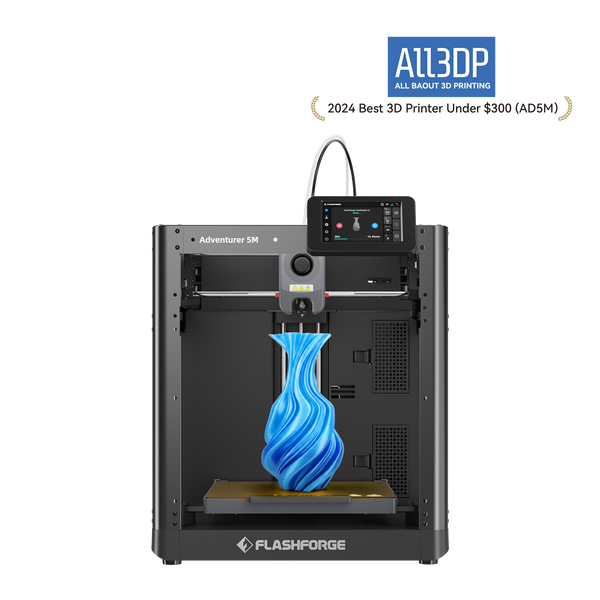
When to Choose Adventurer 5M
For models, toys, home accessories, and basic prototypes, PLA, PETG, and TPU usually cover the job well. In that kind of workflow, paying extra for enclosure features that may see little use is often unnecessary.
The Flashforge Adventurer 5M still provides the high-speed CoreXY system, automatic leveling, and quick-release nozzles that matter more in everyday printing. Beginners, home makers, and budget-conscious users can therefore get strong printing efficiency without paying for features outside their usual needs.
When to Choose Adventurer 5M Pro
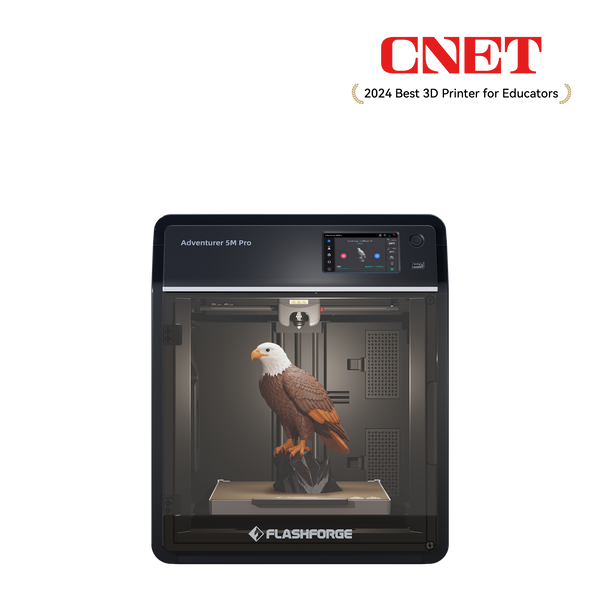
The decision shifts once ABS or ASA becomes part of the material list, or the printer is expected to run regularly in a home office, classroom, or office. Under those conditions, an open-frame machine offers less control over the printing environment and provides no built-in air management.
That is where the Flashforge Adventurer 5M Pro becomes more relevant. Its enclosed body, HEPA and activated carbon filtration, and built-in camera support a more stable printing environment, remote job monitoring, and a more complete indoor printing experience.
Adventurer 5M Pro
Conclusion
The Adventurer 5M vs Adventurer 5M Pro comparison ultimately comes down to how you plan to print. Both models offer similar core performance, but the 5M is the better fit for users focused on common materials, everyday projects, and overall value.
The Adventurer 5M Pro makes more sense when your workflow calls for ABS or ASA, an enclosed printing environment, air filtration, or built-in camera monitoring. Rather than treating the Pro as a general performance upgrade, match each printer to your materials, workspace, and long-term printing needs.
FAQ
Can You Add an Enclosure to the Adventurer 5M?
Yes. Flashforge offers an enclosure kit for the Adventurer 5M, and users can also print the required enclosure parts using official files, but adding an enclosure does not make the 5M identical to the 5M Pro in features such as filtration and built-in monitoring.
Can Adventurer 5M or 5M Pro Print in Multiple Colors?
No, neither model is designed for automatic multi-color printing. Both use a single-extruder system, so users looking for integrated multi-color capability should consider a printer designed specifically for that workflow.
What Slicer Software Works With Adventurer 5M and 5M Pro?
Both printers work with Flash Studio Desktop and OrcaSlicer. Flash Studio Desktop is the updated version of Orca-Flashforge and is the current official desktop slicer for the Adventurer 5M series.
Are Adventurer 5M and 5M Pro Nozzles Interchangeable?
Yes. The Adventurer 5M and 5M Pro use the same quick-release nozzle assemblies, with 0.25, 0.4, 0.6, and 0.8 mm options available for different levels of detail and material flow.
Can You Add a Camera to the Adventurer 5M?
Yes, a camera can be purchased and installed on the Adventurer 5M. Unlike the 5M Pro, however, the standard 5M does not include a built-in camera from the factory.
Can Adventurer 5M and 5M Pro Use Third-Party Filament?
Yes, both models can use third-party filament. Flashforge specifies 1.75 mm filament for the 5M series, although temperature and slicer settings may need adjustment because filament behavior varies between brands.