Choosing the best multicolor 3D printer depends on more than how many colors it can print. Different systems vary in material compatibility, switching speed, filament waste, calibration requirements, and long-term operating cost.
A shared-nozzle printer may offer a simpler and more affordable entry point, while independent toolheads can reduce the time and material consumed by frequent changes. This guide explains the main types of multicolor 3D printers, compares suitable models for different use cases, and highlights the features that matter when balancing print quality, efficiency, and budget.
What Is a Multicolor 3D Printer?
A multicolor 3D printer produces a single model with two or more colors during the same print job. Instead of printing individual parts and assembling or painting them afterward, the machine changes filament or toolheads at points defined in the sliced file.
Multicolor printing is commonly used for toys, decorative models, signs, logos, educational tools, color-coded fixtures, prototypes, and customized products.

How Does a Multicolor 3D Printer Work?
The slicer divides a model into color regions and assigns each region to a filament slot, extruder, or toolhead. During printing, the machine follows those assignments and changes the active filament whenever it reaches a new color region.
A single-nozzle system unloads one filament and feeds another through the same hotend. A multi-toolhead printer parks the inactive tool and selects another toolhead that already contains the required filament. Both methods can create multicolor parts, but they differ in switching time, purge requirements, material compatibility, and calibration.
Multicolor vs. Multi-Material 3D Printing
Multicolor printing usually combines different colors of the same material, such as several shades of PLA. Multi-material printing combines filaments with different properties, such as rigid PLA with flexible TPU or a structural filament with soluble support.
A printer that accepts several colors does not automatically support every material combination. Nozzle temperature, bed temperature, cooling, shrinkage, and layer adhesion must remain compatible. Multi-material projects therefore require more careful hardware and filament selection than color-only prints.
What Types of Multicolor 3D Printers Are Available?
In multicolor 3d printing, the printing system often has a greater effect on daily use than the advertised number of colors. Most multicolor FDM printers use one of the following designs.
Single-Nozzle Filament Switching Systems
A single-nozzle system connects several spools to one extruder and automatically loads the selected filament when a color change is required. These systems are compact, relatively affordable, and accessible to beginners.
Because every color passes through the same nozzle, part of the previous filament must be removed before a clean transition can begin. This adds switching time and usually creates purge material. Models containing many small color regions may therefore take significantly longer than similar single-color parts.
Dual-Extruder and IDEX 3D Printers
Dual-extruder printers use two nozzles, while an IDEX printer places each extruder on an independently controlled carriage. Both designs work well for two-color models, soluble supports, or combinations such as a rigid body with flexible details.
They require less filament loading and unloading than shared-nozzle feeders, but users must control inactive-nozzle oozing and maintain accurate nozzle offsets. Their two-tool capacity also limits projects that need more than two colors or materials.
Multi-Toolhead and Tool-Changer 3D Printers
A tool-changer assigns each filament to a separate extruder and hotend. When the model requires another color, the printer parks the current tool and picks up the next one.
This design reduces repeated unloading and cross-color flushing, making it efficient for models with frequent changes. Different nozzle diameters and materials can also remain installed simultaneously. The main trade-offs are a higher purchase price, additional hotend maintenance, and the need for precise toolhead-offset calibration.
Color-Mixing Hotend 3D Printers
A color-mixing hotend feeds two or more filaments into one melt zone. By changing their feed ratios, the printer can produce gradients and intermediate shades instead of switching only between separate solid colors.
Mixing hotends are useful for artistic parts and gradual color transitions, but exact color reproduction can be difficult. The filaments must also have similar melting and extrusion behavior, limiting their suitability for multi-material functional parts.
Best Multicolor 3D Printers by Use Case
No single model is ideal for every user. The following recommendations focus on ease of use, filament efficiency, professional material support, overall workflow, and small-batch production.

Best Multicolor 3D Printer for Beginners: Flashforge AD5X
The Flashforge AD5X is a practical entry point for users who want four-color printing without managing several independent extruders. Its integrated Intelligent Filament System automatically feeds and switches filament through one shared nozzle, while one-click leveling and a setup time of approximately ten minutes reduce the initial learning curve.
The AD5X offers a 220 × 220 × 220 mm build volume, a maximum print speed of 300 mm/s, a maximum travel speed of 600 mm/s, acceleration up to 20,000 mm/s², and a 300°C maximum nozzle temperature. It is best suited to PLA and PETG toys, labels, decorative models, and personalized desktop projects. Like other shared-nozzle systems, it still requires users to account for purge waste when a design contains frequent color changes.
Best Low-Waste Multicolor 3D Printer: Flashforge Creator 5
The Flashforge Creator 5 uses four independent FlashSwap toolheads, allowing each color or material to remain loaded in its own extruder. Instead of feeding every filament through the same nozzle, the printer changes tools, reducing the repeated loading and cross-color flushing associated with shared-nozzle systems.
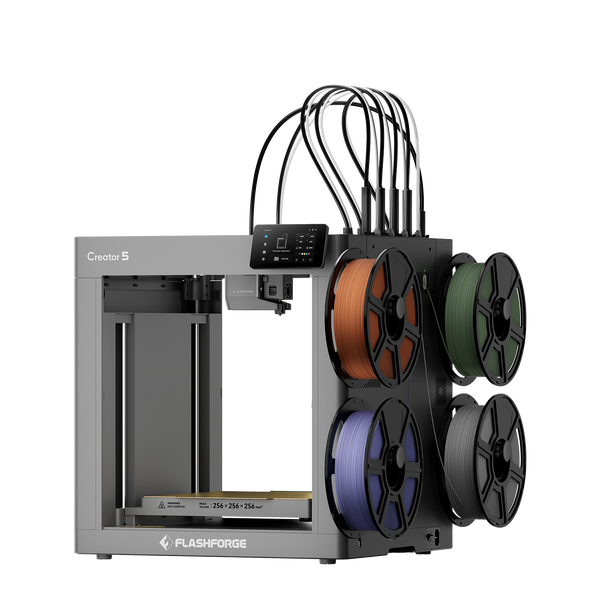
Flashforge Creator 5 4-Toolheads Multi-Color 3D Printer | 500% Faster, Zero Purge Waste
It provides a 256 × 256 × 256 mm build volume, automatic toolhead-offset calibration, a maximum nozzle temperature of 320°C, a 120°C heated bed, and optional 0.25, 0.6, and 0.8 mm nozzles. Its open-frame design is best suited to PLA, PETG, TPU, PVA, BVOH, and compatible composite filaments.
Independent tools reduce purge requirements during material changes, but the printer may still use initial purging or a prime structure to stabilize extrusion. Actual waste therefore depends on the material profiles, model, and slicer settings rather than being completely eliminated in every job.
Best Professional Multicolor and Multi-Material 3D Printer: Flashforge Creator 5 Pro
The Flashforge Creator 5 Pro combines four independent toolheads with a rigid enclosed frame and active chamber heating up to 65°C. The more stable thermal environment makes it better suited to ABS, ASA, PC, PC-ABS, PA, and fiber-reinforced materials that are sensitive to drafts and uneven cooling.
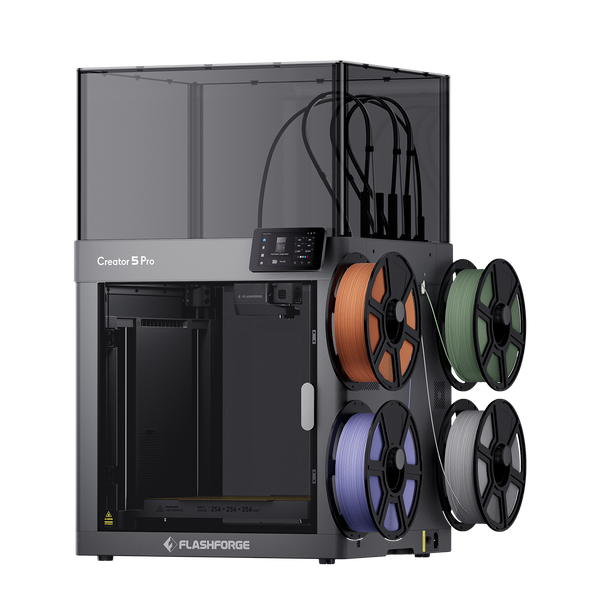
Flashforge Creator 5 Pro 4-Toolheads Enclosed Multi-Color 3D Printer | 500% Faster, Zero Purge Waste
The four tools can be assigned to different colors, rigid and flexible materials, soluble supports such as PVA or BVOH, or different nozzle diameters. The printer also includes automatic toolhead-offset calibration, adaptive chamber airflow, remote monitoring, and HEPA13 with activated-carbon filtration.
Its main specifications include a 256 × 256 × 256 mm build volume, a 320°C maximum nozzle temperature, a 120°C bed, a 300 mm/s maximum print speed, and acceleration up to 30,000 mm/s². These features make it suitable for design studios, engineering prototypes, functional parts, and professional multi-material workflows.
Quick Comparison of the Multicolor 3D Printers
| Model | Best For | Multicolor System | Capacity |
| Flashforge AD5X | Beginners | Single-nozzle switching with IFS | Up to 4 colors |
| Flashforge Creator 5 | Low-waste desktop printing | 4 independent toolheads | 4 colors or materials |
| Flashforge Creator 5 Pro | Professional multi-material printing | Enclosed 4-toolhead system | 4 colors or materials |
How to Choose the Best Multicolor 3D Printer
Start with the types of models you plan to produce rather than choosing the printer with the highest advertised color count.
Choose the Right Multicolor Printing System
A shared-nozzle feeder is usually the most accessible option for occasional four-color models. A dual-extruder or IDEX printer is more appropriate when most projects use two materials or soluble supports. Independent toolheads become more valuable when designs require frequent changes, purge waste affects operating cost, or different nozzle sizes must remain available.
The best 3d printer is not necessarily the model with the most filament slots. It should match the number of colors you regularly use, the materials your projects require, and the amount of switching time and auxiliary waste your workflow can accept.
Match Colors, Materials, and Build Volume to Your Projects
Four colors are sufficient for many toys, logos, labels, educational models, and decorative parts. Additional toolheads become more useful when a project also requires soluble support, a flexible material, or several nozzle sizes.
Build volume should match the finished object and the number of parts placed on each plate. A 220 mm desktop platform is suitable for many household and creative projects, while larger prototypes or production batches may require more space.
Material support should be evaluated across the complete printing environment. Check the nozzle and bed temperatures, enclosure design, chamber control, cooling, and supported filament profiles. A machine capable of feeding four spools may still be unsuitable for combining materials with very different temperature or shrinkage requirements.
Compare Printing Efficiency, Filament Waste, and Total Cost
Purchase price is only one part of multicolor printing cost. Shared-nozzle machines may consume additional filament and time with every change. Tool changers reduce those interruptions but introduce more hotends, nozzles, and calibration points.
When comparing a 3d printer for sale, consider the number of changes in a typical model, estimated purge weight, total printing time, spare parts, drying equipment, and operator attention. A low-waste system with a higher initial price may produce a lower cost per finished part when used regularly.
Avoid evaluating value through maximum speed alone. Model geometry, filament flow, cooling, tool-change frequency, and slicer settings can have a greater effect on completion time than the advertised motion limit.
Tips for Better Multicolor 3D Printing Results
Consistent results depend on model preparation, calibration, and filament condition as much as the printer itself.
Reduce Unnecessary Color Changes and Purge Waste
Arrange color regions in larger continuous areas whenever the design allows it. Hundreds of thin alternating layers require more changes than a model divided into distinct sections. Changing the model orientation may also reduce how often different colors overlap at the same height.
Begin with conservative flushing values, then reduce them gradually after checking for color contamination. Where the slicer supports it, some purge material can be redirected into infill or a separate object. Keep unwanted color transitions away from visible exterior walls.
For logos, labels, and text, consider designing the contrasting color as a shallow inlay or raised surface. This often reduces the number of layers that require a material change.
Calibrate the Printer and Optimize Slicer Settings
Run leveling, flow calibration, pressure advance, and vibration compensation before an important print. A tool-changing printer also needs accurate XYZ offsets so that colors meet without gaps, overlapping lines, or visible steps.
Check nozzle temperature, retraction, wiping distance, prime-tower size, and flushing volume for each filament. Flashforge’s comparison of Orca Slicer and Orca-Flashforge explains their profiles, connectivity, and workflow differences. Orca-Flashforge has since been renamed Flash Studio Desktop.
Do not assume every color from the same material family will flow identically. Pigments and additives can slightly affect extrusion, so test unfamiliar spools before starting a long multicolor job.
Keep Filaments Dry and Use Compatible Materials
Different types of 3d printer filament absorb moisture at different rates. Wet material can cause popping, bubbles, rough surfaces, excessive stringing, unstable extrusion, and weak sections within a multicolor model.
PVA, BVOH, nylon, and TPU need particularly careful moisture control. PLA and PETG are less sensitive but still benefit from sealed storage in humid conditions. One wet spool can disrupt an otherwise correctly prepared multicolor print.
Store opened filament in sealed containers or moisture-resistant bags with desiccant. Flashforge’s guide to storing 3D printer filament covers dry boxes, active dryers, humidity monitoring, and storage methods for common and engineering materials.
Before combining materials, confirm that their printing temperatures, cooling requirements, shrinkage, and layer adhesion are compatible. Two filaments that print successfully on their own may not bond reliably within the same part.
Conclusion
The right multicolor printer depends on the number of colors, frequency of changes, required materials, and expected production volume. The Flashforge AD5X provides an accessible four-color workflow for beginners, while the Creator 5 uses independent tools to reduce switching waste. The Creator 5 Pro adds active chamber heating for professional multi-material and engineering applications.
The Bambu Lab P2S Combo suits users who prioritize an automated shared-nozzle workflow, while the Original Prusa XL offers five tools and a larger build volume for production-oriented projects. Compare the printing system, material support, purge requirements, calibration, and long-term operating cost before focusing on color capacity alone.
FAQ
Can a Regular 3D Printer Be Upgraded for Multicolor Printing?
Some printers can be upgraded with a compatible filament-switching module, multi-material unit, or toolhead system. Compatibility depends on the extruder, firmware, electronics, slicer support, and available mounting space. A printer designed for multicolor operation is usually easier to configure and maintain than a heavily modified single-color machine.
Do Multicolor 3D Prints Require Special Model Files?
Not always. Separate STL files can be imported as individual parts and assigned different colors in the slicer. Some slicers also allow users to paint color regions directly onto a single model.
The 3MF format is often more convenient because it can preserve multiple objects, color assignments, and printing settings in one project. Review the sliced layers before printing to confirm that every region has the correct material assignment.
Can Multicolor 3D Printers Create Logos and Text Without Painting?
Yes. Logos, labels, numbers, and text can be modeled as raised, recessed, or inlaid regions and assigned a contrasting filament.
Clarity depends on nozzle diameter, line width, layer height, and feature thickness. A smaller nozzle can reproduce finer text, although it also increases printing time.
Are Multicolor 3D Printers Harder to Maintain?
They generally require slightly more maintenance than basic single-color printers because they contain additional filament paths, sensors, cutters, tubes, or toolheads. Automated loading and calibration reduce daily setup, but there are still more components to inspect when a jam or alignment problem occurs.
What Maintenance Does a Multicolor 3D Printer Need?
Clean the nozzle, wiping area, and build plate regularly. Inspect PTFE tubes, filament cutters, drive gears, spool paths, and toolhead contacts for wear or debris.
Keep each spool dry, update the printer and slicer software, and repeat flow or tool-offset calibration after replacing a nozzle or hotend. Flushing and prime-tower settings should also be reviewed whenever a new filament profile is introduced.