What should you 3D print next? The best project is one you will actually use, display, or give away. A cable clip teaches sizing and bed adhesion; a personalized sign introduces lettering and color; a realistic figurine calls for a different kind of detail. Here are 20 ideas across everyday tools, home décor, games, gifts, and learning.
Quick Comparison of the Best Things to 3D Print
Use this table to choose a project that fits your desktop 3D printer and available time. Material suggestions depend on printer compatibility.
| 3D print idea | Best for | Difficulty | Recommended material | Estimated print time* |
|---|---|---|---|---|
| Cable clips | Desk tidying | Beginner | PLA | 20 min–1 hr |
| Phone stand | Daily use | Beginner | PLA | 1–3 hr |
| Drawer dividers | Organization | Beginner | PLA or PETG | 2–5 hr |
| Replacement parts | Small repairs | Intermediate | PETG | 30 min–3 hr |
| Pegboard hooks | Workshop storage | Beginner | PETG | 1–3 hr |
| Self-watering planter | Plants | Intermediate | PETG | 4–10 hr |
| Decorative vase | Display | Beginner | PLA | 2–6 hr |
| Lampshade | Lighting décor | Intermediate | PLA or PETG | 3–8 hr |
| Lithophane panel | Photo display | Intermediate | White PLA | 2–6 hr |
| Multicolor wall art | Color experiments | Intermediate | PLA | 3–8 hr |
| Flexi animal | Toys | Beginner | PLA | 2–5 hr |
| Fidget toy | Moving parts | Intermediate | PLA | 1–4 hr |
| Miniatures and terrain | Tabletop games | Intermediate | PLA or suitable resin | 1–8 hr |
| Game insert | Storage | Intermediate | PLA | 4–12 hr |
| Cosplay prop | Costume making | Intermediate | PLA or PETG | 6–20+ hr |
| Nameplate | Personalized gift | Beginner | PLA | 1–4 hr |
| Craft stamp or cutter | Crafts | Intermediate | PLA or PETG | 30 min–2 hr |
| Pet accessory | Customization | Intermediate | PETG or compatible TPU | 1–5 hr |
| Educational model | Hands-on learning | Intermediate | PLA | 2–8 hr |
| Device mount | Desk or camera setup | Intermediate | PETG | 1–5 hr |
These are illustrative ranges, not measured benchmarks. Size, layer height, infill, supports, and printer settings can change print time substantially. Resin and full-color MJP projects have different workflows from projects made with an FDM 3D printer.
Useful Things to 3D Print for Everyday Life
In 3D printing, start with a dimension you can measure: a cable diameter, drawer width, or mounting hole. That turns an appealing model into a useful fit.

1. Cable Organizers and Cord Clips
Size clips to your cables and print one test before making a set. If the grip is too tight, widen the opening.
2. Adjustable Phone and Tablet Stands
Choose a sturdy base and an angle suited to calls or recipes. Check that the stand accommodates your device with its case on.
3. Modular Drawer Organizers
Measure the drawer and print separate trays for pens, screws, or craft supplies. You can replace individual compartments as your needs change.
4. Replacement Knobs, Clips, and Household Parts
Measure the broken part and the surfaces it connects to, then test the fit. Avoid home-printed substitutes for safety-critical components.
5. Pegboard Hooks and Tool Holders
Match your board’s hole spacing and size each hook for the intended tool’s weight.
If these are your first functional projects, the Flashforge Adventurer 5M is a practical starting point for stands, bins, hooks, and basic repair pieces. Its automatic leveling and quick-release nozzle simplify setup and maintenance while you learn. Test the fit and load of each functional part before daily use.
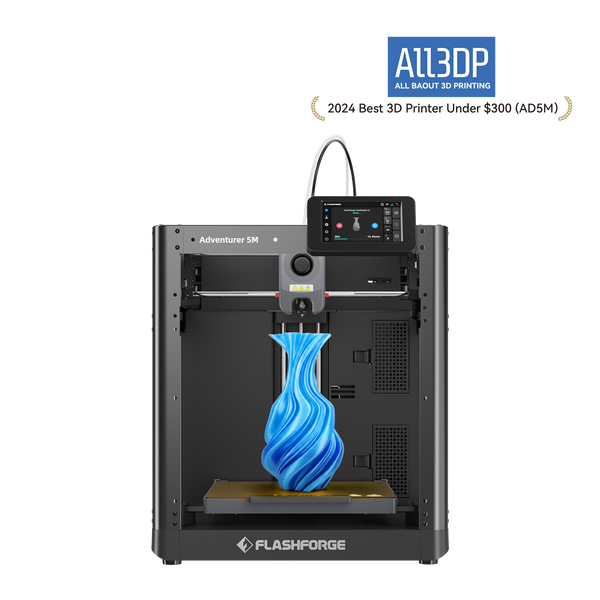
Imprimante 3D Flashforge Adventurer 5M, vitesse élevée de 600 mm/s, adaptée aux débutants
Creative Things to 3D Print for Home Decor
Décor projects let you experiment with texture, color, and lighting. Consider how each finished object will be used before choosing its 3D printer filament.

6. Self-Watering Planters
Separate soil from a water reservoir and use a wick to move moisture. PETG is a material to consider for a damp setting, but test the finished print for leaks and place it on a tray indoors.
7. Modern Vases and Decorative Containers
Try a textured vase or geometric catchall. Thin walls printed in vase mode may leak, so use a watertight insert for fresh flowers.
8. Custom Lampshades
With a home 3D printer, you can make a patterned shade for a low-heat LED fixture. Check the required clearance and keep printed plastic away from hot bulbs and exposed wiring.
9. Lithophane Photo Panels
Convert a high-contrast photo into a panel with varied thickness, then place an LED backlight behind it to reveal the image.
10. Multicolor Wall Art
Try layered maps or typography with distinct color regions. Preview the color changes in your slicer before printing.
Fun Things to 3D Print for Toys and Games
When choosing projects for a 3D printer for kids, begin with a small moving-part test. A joint that moves freely on one printer may fuse on another.
11. Articulated Animals and Flexi Toys
Follow the designer’s recommended orientation and avoid shrinking the model until the gaps between joints close. Check for detachable pieces before giving a print to a child.
12. Print-in-Place Fidget Toys
Choose a model designed to move without assembly. Follow its layer-height and first-layer recommendations so the moving parts do not fuse.
13. Tabletop Miniatures and Terrain
FDM printing works well for scenery. Highly detailed miniatures may benefit from a finer nozzle or a suitable resin workflow, which brings separate handling and post-processing steps.
14. Custom Board Game Inserts
Measure your cards, tokens, and game box. If you use card sleeves, include their extra width and leave room to lift each tray out.
15. Cosplay Props and Wearable Accessories
Split large props along seams you can hide. Print a small fit test before committing to a complete helmet or wearable piece.
For props or game pieces with several distinct colors, the Flashforge Creator 5 uses four independent toolheads and can assign up to four colors to one model. Separate toolheads avoid the shared-nozzle purging associated with color changes in some filament workflows. It remains a filament printer, so its output differs from a photographic full-color print.
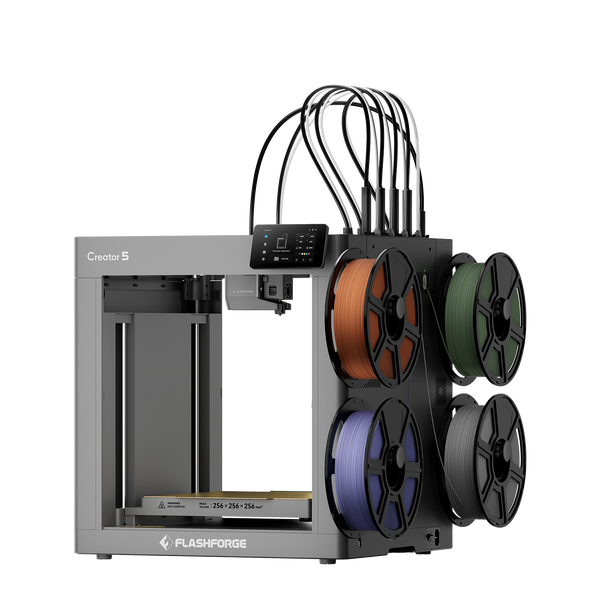
Flashforge Creator 5 4-Toolheads Multi-Color 3D Printer | 500% Faster, Zero Purge Waste
Personalized Things to 3D Print as Gifts
A name, pet, hobby, or favorite game can make a familiar design feel personal.
16. Personalized Nameplates and Signs
Add raised letters to a desk plaque or bedroom sign. Verify the spelling in the slicer preview before printing.
17. Cookie Cutters and Craft Stamps
Printed stamps can add patterns to clay and other craft materials. For cookie cutters, do not assume a print is suitable for food contact because its filament is described as food safe. Material, production, cleaning, and intended use all matter. The FDA's food-contact guidance explains why suitability must be assessed for the intended use.
18. Custom Pet Accessories
Customize a name-tag holder or decorative clip. Keep printed parts out of the load path of a leash or collar, and check for sharp edges or loose pieces.
For a realistic full-color pet or character figurine, the Flashforge CJ270 offers a different workflow. It uses MJP technology with UV curing to produce full-color objects, making it relevant when detailed color and surface appearance are central to the gift. The project still needs a suitable 3D model; an ordinary photo alone is not a complete printable figurine.
Educational and Tech Accessories to 3D Print
Pick a model with a clear teaching or mounting purpose.
19. Educational Models
Make a topographic map, geometric solid, or mechanical assembly tangible. If the model will be used for teaching, check the accuracy of its source.
20. Camera, Controller, and Gaming Mounts
Measure mounting holes and contact surfaces carefully. Use purpose-made, rated hardware for heavy or overhead equipment.
How to Choose Your Next 3D Printing Project
The right project depends on your experience, time, material, and printer.
Choose by Skill Level
Begin with a one-piece organizer or sign. Move to fitted parts, print-in-place joints, or assembled props once you can check tolerances and troubleshoot the first layer.
Choose by Available Printing Time
A small clip or stamp may suit a short session; a planter or game insert may take much longer. Check the slicer preview before scheduling the job. Flashforge's slice preview documentation shows where to review estimated time and material use.
Choose by Material
PLA suits many indoor beginner and decorative projects. Consider PETG for more demanding everyday parts and compatible TPU for flexible accessories. Flashforge's guide to filament types explains the uses and tradeoffs of common materials.
Choose by Printer Capability
Check build volume, supported materials, nozzle options, and color workflow. A large prop may need to be split into sections; a fine miniature needs detail; and a multicolor sign is a different task from a realistic full-color figurine.
Where Can You Find 3D Models to Print?
A suitable file must fit both your project and your intended use.
Download Ready-Made STL and 3MF Files
Search a model library using the object name plus a dimension or use case. Read the designer’s print notes, then inspect the file in your slicer. STL commonly carries geometry, while 3MF can preserve richer project information, depending on the file and software.
Customize or Create Your Own 3D Models
Resize a tray, add text to a sign, or design a part around measurements you take yourself. Flashforge's guide to creating 3D models for printing covers the path from a design idea to a printable file.
Check the Model License Before Printing or Selling
Read the license on the specific download page. A free download does not automatically grant commercial rights, and some licenses require attribution. Creative Commons explains its different license conditions. Also check for third-party rights involving characters or logos.
What Should You Check Before Starting a 3D Print?
Run through this checklist once the file is in your slicer:
- Model size: Does it fit the build area and its intended location?
- Supports: Can you remove them without damaging important details?
- Orientation: Will the visible surfaces and load-bearing areas print appropriately?
- Material: Does it suit the expected temperature, moisture, and handling?
- Part tolerances: Will joints, mounting holes, and mating pieces fit?
- Print time and material: Does the slice preview match your plan?
- Model license: Does it permit your intended use?
Conclusion
Choose a project that suits your printer and serves a real purpose. Start small, check its dimensions and material, and use the slicer to confirm time and filament use. A reliable first result gives you a foundation for more ambitious multicolor, moving, or personalized prints.
Frequently Asked Questions
These quick answers can help narrow down a first project.
What Is the Easiest Thing to 3D Print for a Beginner?
A cable clip or simple nameplate is a good first print. Both are small, generally need little or no support, and help you check bed adhesion and sizing.
What Are the Most Useful Things to 3D Print?
Drawer organizers, device stands, pegboard hooks, and carefully tested replacement parts can solve everyday problems. Choose an object you can measure in your own space.
What Are the Most Popular Things to 3D Print in 2026?
Flexi toys, organizers, personalized signs, and multicolor décor are useful directions to explore. This article is a curated idea list, rather than a verified sales or download ranking.
What Can You 3D Print in Less Than One Hour?
A small cable clip, badge, or craft stamp may take less than an hour. Size and settings matter, so check your slicer’s estimate.
Which 3D Prints Use the Least Filament?
Small, thin objects such as clips, tags, and simple stamps often use little filament. Compare the estimated grams in your slicer, since walls, infill, and supports affect material use.
Can You Sell Things Made With a 3D Printer?
You may be able to sell your original designs or prints made under a license permitting commercial use. Check the model’s terms and any third-party rights before listing it for sale.