PETG filament commonly needs drying at about 55 to 70°C for 5 to 8 hours, although the correct setting depends on the formulation. Current Flashforge guidance specifies 70°C for 5 hours for HS PETG and PETG-CF, while its general PETG reference recommends 70°C for 6 hours.
Wet PETG may produce popping sounds, excessive stringing, bubbles, rough surfaces, weak layers, and inconsistent extrusion. This guide explains how to identify moisture problems, choose a safe PETG drying temperature and time, dry a spool correctly, and keep the material dry during storage and long print jobs.
What Is the Best PETG Drying Temperature?
The best PETG drying temperature is the value specified for the exact filament. A general range provides a useful starting point, but the spool label, technical data sheet, or official product page should always take priority.
Recommended PETG Drying Temperature and Time
PETG is generally dried at approximately 55 to 70°C for 5 to 8 hours. Flashforge provides the following product-specific guidance:
|
PETG Product |
Material Type |
Recommended Temperature |
Recommended Time |
Notes |
|
Flashforge HS PETG |
High-speed PETG |
70°C |
5 hours |
Use a temperature-controlled convection oven or suitable filament dryer |
|
Flashforge PETG-CF |
Carbon-fiber-reinforced PETG |
70°C |
5 hours |
Use abrasion-resistant printing hardware |
|
General Flashforge PETG Reference |
Standard PETG |
70°C |
6 hours |
Confirm the instructions for the exact spool |
These settings come from the Flashforge filament drying guide and relevant product information. Follow the spool label if it provides different instructions, as formulations and official recommendations may change.
Before applying a general drying cycle, check the official instructions for the exact 3D printer filament you plan to use. Standard PETG, high-speed PETG, transparent PETG, and reinforced PETG may respond differently to heat and moisture.
For users printing functional parts at higher speeds, Flashforge HS PETG is one relevant option. Its optimized flow and cooling characteristics help maintain stable feeding, dimensional accuracy, and smoother surfaces during faster printing. Drying it at the specified 70°C for 5 hours helps prevent absorbed moisture from disrupting these properties. Treat this as a product-specific example rather than a universal PETG setting.
Why Do PETG Drying Recommendations Vary by Brand?
PETG is one of several 3D printer filament types, and its formulation can vary by brand rather than following one completely standardized recipe. Different products may contain pigments, flow modifiers, impact additives, crystallization-control additives, or reinforcing fibers. These changes can influence moisture absorption, heat transfer, extrusion behavior, and drying requirements.
A high-speed PETG may be formulated for better melt flow, while a transparent PETG may prioritize clarity. Carbon-fiber PETG contains short reinforcing fibers that improve stiffness and dimensional stability but also increase nozzle wear. Because the formulations are different, using one drying temperature for every PETG product may produce inconsistent results.
Flashforge PETG-CF, for example, adds carbon fiber to improve rigidity, wear resistance, and dimensional stability. It requires drying at 70°C for 5 hours and should be paired with abrasion-resistant printing hardware.
The Flashforge Creator 5 Pro lists PETG-CF among its recommended materials and uses hardened-steel nozzles, making it suitable for reinforced functional parts. For buyers comparing a 3d printer for sale, nozzle material, enclosure design, bed temperature, and supported filament types are more relevant than maximum speed alone.
The printer does not change the required drying cycle. Instructions for the exact filament still take priority.
What Happens If You Dry PETG at Too High a Temperature?
Excessive heat can soften the filament, deform the spool, alter the filament diameter, or cause neighboring windings to stick together. A partially fused spool may still look usable but create enough feeding resistance to cause under-extrusion or failed prints.
Temperature overshoot is a particular concern with household ovens. Many ovens cycle above and below the selected setting, especially at relatively low temperatures. A display set to 65°C does not guarantee that the air surrounding the spool remains at exactly 65°C.
Use a temperature-controlled filament dryer or convection oven with reliable airflow. Verify the actual chamber temperature with an independent thermometer, and confirm that the spool can tolerate the required heat. Temperature control during drying should also be distinguished from temperature control during printing. The Flashforge Creator 5 Pro uses an actively heated chamber up to 65°C to maintain a stable printing environment for temperature-sensitive materials, but the chamber is not intended to replace a dedicated filament dryer.
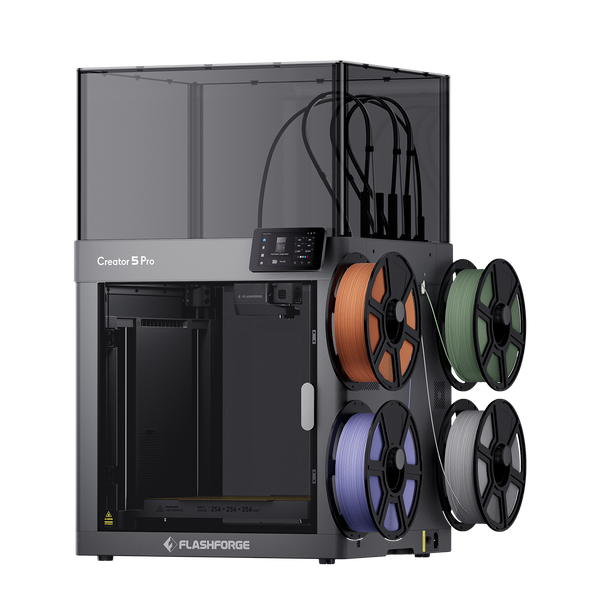
Flashforge Creator 5 Pro 4-Toolheads Enclosed Multi-Color 3D Printer | 500% Faster, Zero Purge Waste
Do not use a microwave, heat gun, hair dryer, or uncontrolled heat source. Raising the temperature above the manufacturer’s recommendation is not a safe way to shorten the drying cycle.
How Can You Tell If PETG Filament Is Wet?
Moisture is best diagnosed by considering sound, extrusion behavior, and surface quality together. Stringing alone does not prove that PETG is wet because nozzle temperature, travel speed, retraction, and cooling settings may create similar defects.
Popping or Hissing Sounds During Extrusion
Popping, crackling, or hissing from the nozzle is one of the clearest signs of wet PETG. Absorbed water turns into vapor inside the hot end, creating bubbles and small pressure changes in the molten material.
Run a short manual extrusion test before changing slicer settings. If the extruded strand contains visible bubbles or the nozzle repeatedly pops, dry the spool before troubleshooting temperature, flow, or retraction.
A dry PETG strand should normally extrude in a relatively smooth and continuous line. Occasional minor variation may come from the extrusion system, but repeated popping combined with bubbles strongly suggests moisture.
Severe Stringing, Bubbles, and Rough Print Surfaces
Wet PETG may produce heavy strings, small surface pits, cloudy transparent areas, bubbles, and rough extrusion lines. Moisture can also increase oozing because expanding vapor disrupts pressure inside the nozzle.
Use several symptoms to distinguish moisture from an incorrect printing profile. If a previously reliable spool develops bubbles, rough surfaces, and much heavier stringing after being left in humid air, moisture is a likely cause.
If the filament extrudes smoothly but still produces light stringing, the problem may instead come from nozzle temperature, travel movement, cooling, or retraction.

Layer Separation, Reduced Strength, and Inconsistent Extrusion
Moisture can create voids and irregular extrusion widths that weaken bonding between adjacent lines and layers. Printed parts may show inconsistent walls, poor transparency, reduced strength, or unexpected separation under load.
A BioResources study comparing moisture-conditioned PETG with PETG dried at 70°C for 8 hours found that the dried material produced parts with 18.1% higher tensile strength and a 17.0% higher elastic modulus under the study’s testing conditions.
Results will vary between materials, printers, model geometries, and print settings. However, the experiment demonstrates how moisture-related voids and extrusion instability can affect mechanical performance.
Why Does PETG Absorb Moisture?
More information on how filament dryness and humidity affect printing helps explain why both steps are necessary for consistent extrusion and repeatable print quality. Both steps are necessary for consistent extrusion and repeatable print quality.
PETG Is a Hygroscopic Material
PETG is hygroscopic, which means it absorbs water vapor from the surrounding air. Moisture gradually diffuses into the material instead of remaining only on its surface, so wiping the filament with a dry cloth cannot restore a wet spool.
When moisture-containing PETG enters the hot end, the water rapidly vaporizes. This may create bubbles, unstable flow, surface defects, and microscopic voids inside the printed part.
PETG is generally less moisture-sensitive than materials such as nylon, PVA, or BVOH. However, it can still absorb enough moisture to affect print quality, especially when stored in a warm or humid environment.
How Humidity and Exposure Time Affect PETG
PETG absorbs moisture more quickly in a warm, humid workspace than in a cool, climate-controlled room. Exposure time also matters. A spool left uncovered for several days is more likely to develop problems than one sealed immediately after each use.
There is no universal number of hours after which every PETG spool becomes too wet to print. Relative humidity, room temperature, formulation, packaging, spool size, and print requirements all affect the result.
A spool used for decorative models may appear acceptable even with slight moisture, while the same material may be unsuitable for a mechanically loaded part. In humid environments, printing directly from a dry box is more reliable than leaving the active spool exposed.
Why Newly Opened PETG May Already Contain Moisture
Vacuum packaging reduces exposure but does not guarantee completely dry filament. Moisture may remain from production, enter through a damaged seal, or exceed the capacity of saturated desiccant during long-term storage.
The bag may also develop small leaks during shipping or handling. A desiccant packet inside the package helps control humidity, but it cannot always remove moisture already absorbed deeply into the filament.
If a newly opened spool pops, bubbles, or extrudes unevenly, dry it before making major slicer changes. The need to dry a new spool does not automatically mean the filament is defective.
How to Dry PETG Filament Properly
A safe drying cycle depends on accurate temperature, sufficient time, and steady airflow. Increasing the temperature is not a suitable shortcut because the outer windings or spool may soften before moisture escapes from the center.

Step 1: Check the Filament and Spool Instructions
Identify the exact PETG formulation and confirm the recommended drying temperature and time on its label or official product page. Do not assume that standard, high-speed, transparent, and fiber-reinforced PETG require identical cycles.
Check the spool material as well. A temperature that is safe for PETG may still deform a spool made from a lower-temperature plastic. Cardboard spools may also react differently to prolonged heat and airflow.
If the spool’s heat resistance is unknown, use a purpose-built filament dryer and monitor it carefully during the first cycle.
Step 2: Choose a Suitable PETG Drying Method
A dedicated filament dryer is generally the most convenient option because it holds the spool, circulates warm air, and maintains a controlled temperature. Some dryers also allow filament to feed directly into the printer.
A temperature-controlled convection oven can work when the filament manufacturer specifically recommends it, as Flashforge does for HS PETG and PETG-CF. However, household ovens may have inaccurate thermostats or uneven heat distribution.
A food dehydrator may also be suitable if it provides accurate temperature control, continuous airflow, and enough space for the spool. Any appliance used for drying filament should be kept separate from food preparation.
Do not place the spool directly against a heating element. Concentrated heat can deform the spool or soften the outer filament windings even when the average chamber temperature appears acceptable.
Step 3: Preheat the Dryer and Position the Spool
Preheat the dryer before starting the timed cycle so the warm-up period is not counted as effective drying time. Use an independent thermometer to check the actual temperature around the spool instead of relying only on the appliance display.
Position the spool so warm air can circulate around both sides and through its center. Do not block the dryer’s air inlet or outlet.
If the dryer has an exhaust vent, keep it open according to the manufacturer’s instructions. Moist air needs a path to leave the chamber. A completely sealed heated box may allow evaporated moisture to remain around the spool.
Step 4: Use the Correct Temperature and Time
For current Flashforge HS PETG and PETG-CF, dry the filament at 70°C for 5 hours in a convection oven. The general Flashforge PETG reference is 70°C for 6 hours.
Begin with the product-specific instruction instead of automatically choosing the longest available cycle. A lightly exposed spool may recover within the standard drying time, while a severely wet spool may need a longer cycle.
Extend the drying time gradually while keeping the temperature within the approved range. Longer drying at the correct temperature is generally safer than exceeding the recommended heat.
Stop the cycle if the spool deforms, the windings begin to stick together, or the filament changes shape.
Step 5: Test the PETG After Drying
After drying, run a short extrusion test or print a small calibration model using a previously reliable PETG profile. A printer such as the Flashforge Adventurer 5M fits this routine testing workflow because PETG is one of its recommended materials, while automatic bed leveling helps keep first-layer setup consistent.
The best 3d printer for PETG is not simply the model with the highest advertised speed. Reliable extrusion, stable bed heating, accurate temperature control, suitable nozzle options, and well-tuned material profiles are more important for consistent results.
Listen for popping and inspect the extruded strand for bubbles, uneven flow, or a rough texture. Compare the result with the filament’s behavior before drying.
If the symptoms remain, verify the dryer’s actual temperature, airflow, and cycle length before repeating the process. If extrusion becomes smooth but stringing continues, adjust nozzle temperature, travel movement, and retraction one setting at a time.
How to Store PETG Filament After Drying
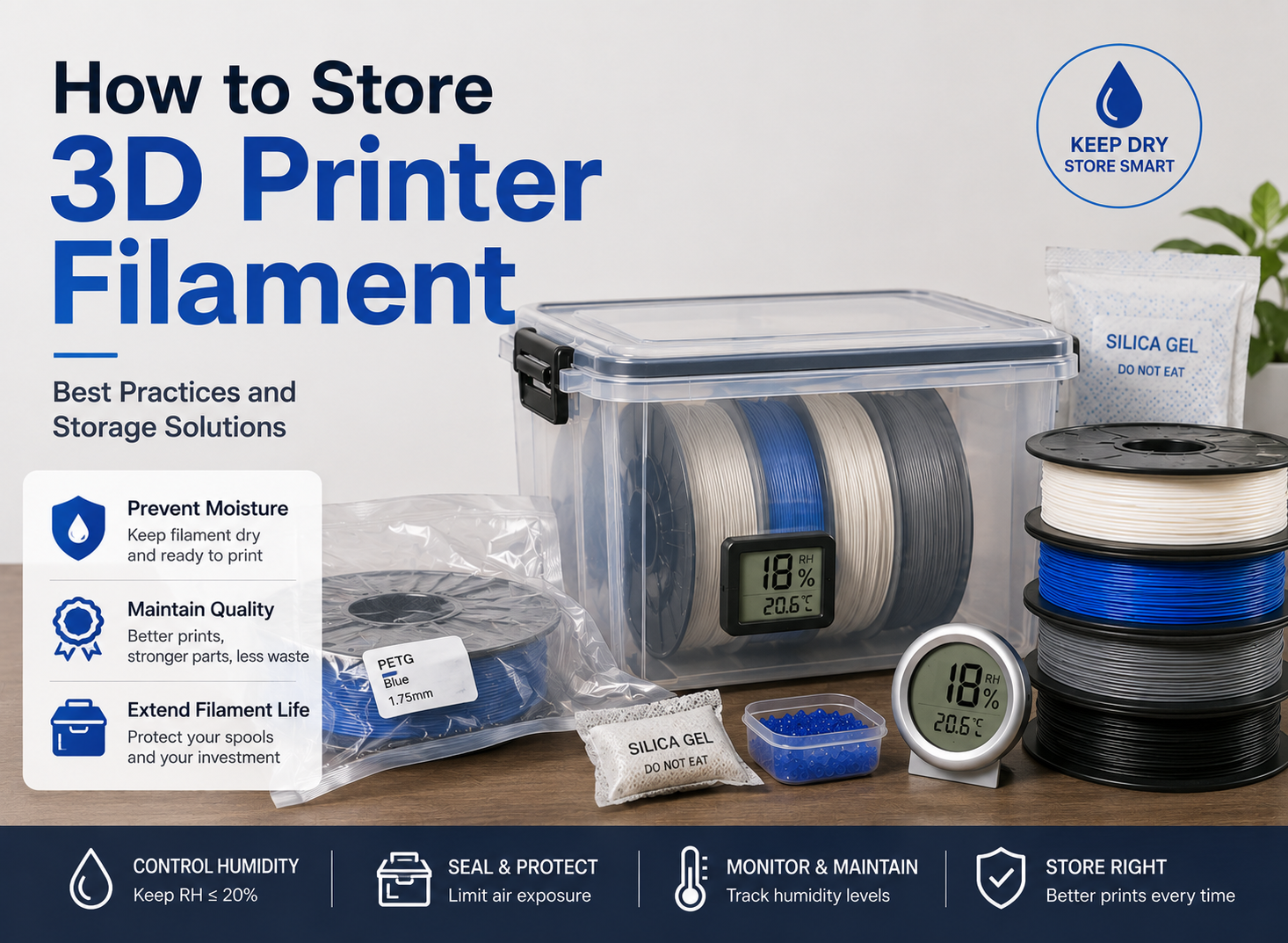
PETG begins absorbing moisture again after it returns to open air. Proper storage protects the result of the drying cycle and reduces the need for repeated drying.
Seal PETG Filament as Soon as It Cools
Allow the spool to cool inside the closed dryer or another low-humidity environment. Once it approaches room temperature, transfer it promptly to an airtight bag or sealed container.
Avoid sealing a very hot spool in an ordinary plastic bag. Allowing it to cool first reduces the risk of damaging the bag and limits condensation caused by temperature differences.
Resealable vacuum bags, gasketed storage boxes, and purpose-built filament containers can all work when they maintain a reliable seal.
Add Desiccant to Control Storage Humidity
Place rechargeable silica gel or another suitable desiccant inside the sealed container. It helps capture moisture in the trapped air and moisture introduced when the container is opened.
Desiccant is mainly a storage-maintenance tool. It should not be expected to dry a severely wet spool at room temperature.
Replace or regenerate the desiccant according to its instructions. Color-changing silica gel can make it easier to see when regeneration is needed, but the indicator should not replace humidity monitoring.
Keep loose desiccant away from the moving filament path and use a container or holder that prevents granules from entering the spool or feeder.
Use a Hygrometer to Monitor Humidity
A small hygrometer is more reliable than estimating storage conditions from the humidity in the room. Position the sensor near the spool rather than directly beside the desiccant, where it may produce an artificially low reading.
Flashforge specifies a printing and storage environment of no more than 20% relative humidity for HS PETG and PETG-CF when the filament is sealed with desiccant.
If the reading rises steadily, inspect the container seal and regenerate or replace the desiccant. A humidity value that remains high after adding fresh desiccant may indicate a leaking container.
Print Directly From a Dry Box During Long Jobs
PETG may remain exposed for many hours during a large or slow print. In humid conditions, feed the filament directly from a sealed dry box or active dryer to limit moisture absorption during the job.
Make sure the spool rotates freely and that the guide tube follows a smooth path. Excessive feeding resistance can cause under-extrusion even when the filament is properly dried.
The filament outlet should also be sealed as much as practical. A large open hole can allow humid air to enter the container throughout the print.
Printing from a dry box is especially useful for large functional parts, transparent PETG, reinforced PETG, or repeated production jobs that require consistent surface quality.
Conclusion
The correct PETG drying temperature depends on the specific formulation. A common reference range is 55 to 70°C for 5 to 8 hours, while current Flashforge guidance specifies 70°C for 5 hours for HS PETG and PETG-CF and 70°C for 6 hours as its general PETG reference.
Dry the spool before changing multiple print settings, verify the actual dryer temperature, and avoid excessive heat. After drying, seal PETG with desiccant and monitor the storage humidity. In humid workspaces or during long prints, feeding directly from a dry box can provide more consistent results.
FAQ
Can PETG Filament Be Dried More Than Once?
Yes. PETG can be dried again when moisture-related symptoms return, provided every cycle stays within the manufacturer’s recommended temperature. Repeated overheating may deform the spool, fuse adjacent windings, or alter the filament.
Should a Full PETG Spool Be Dried Longer Than a Partially Used Spool?
Not automatically. Moisture level, winding density, airflow, and dryer design matter more than the amount of filament remaining. Start with the recommended time and extend the cycle gradually if popping or bubbles continue.
Do PETG Color and Additives Affect Drying Time?
They can. Pigments, flow modifiers, impact additives, and reinforcing fibers may alter the material’s thermal and moisture behavior. Follow the instructions for the exact formulation rather than adjusting the drying cycle based only on color.
Can Wet PETG Damage a 3D Printer or Nozzle?
Wet PETG does not usually damage a nozzle directly, but it may cause unstable extrusion, material deposits, failed prints, and occasional blockages. Abrasive additives such as carbon fiber can wear a standard nozzle regardless of moisture, so nozzle compatibility should be checked separately.
Do You Need to Change Print Settings After Drying PETG?
Usually not if the original profile was correct. Return to the manufacturer’s recommended profile if settings were previously changed to compensate for wet filament. Adjust temperature, flow, or retraction only after confirming that the spool is dry.