PLA plastic is one of the easiest materials to start with in FDM 3D printing. It prints at relatively low temperatures, shows clean surface detail, and usually needs less setup work than materials such as ABS, ASA, nylon, or polycarbonate.
For beginners, PLA is often the first filament that turns a 3D printer into a reliable creative tool. It helps you learn first-layer adhesion, print speed, cooling, and model orientation without dealing with heavy warping or complex material handling. With a stable beginner-friendly printer such as the Flashforge Adventurer 5M Pro, PLA can produce clean models for home projects, classrooms, prototypes, and everyday creative printing.
What Is PLA Plastic in 3D Printing?
PLA plastic is a thermoplastic material used as filament in FDM 3D printers. The printer melts the filament, pushes it through a heated nozzle, and builds the model layer by layer on the print bed.
PLA Meaning and Basic Material Properties
PLA stands for polylactic acid. In desktop 3D printing, it usually comes as 1.75 mm filament wound on a spool.
PLA is known for easy printing, low warping, good detail reproduction, and broad color availability. Its main limits are heat resistance and impact toughness. A PLA part can soften in a hot car, near a heater, or in other high-temperature spaces.
How PLA Filament Works in FDM Printing
In FDM printing, PLA feeds into the extruder, melts in the hot end, and exits through the nozzle as a thin line of softened plastic. The printer places each layer according to the sliced 3D model.
Cooling matters for PLA. When the material cools at the right speed, it can hold clean corners, small details, bridges, and overhangs. If the temperature is too high or cooling is weak, the surface may look rough, glossy, stringy, or soft around fine details.
Why PLA Is Different From Other Plastics
PLA is easier to print than many engineering plastics because it usually needs lower nozzle temperatures, moderate bed heat, and no heated chamber. PETG is tougher but can string more. ABS handles heat better but needs a more controlled printing environment.
For first prints, PLA gives a strong balance of printability and visual quality. For outdoor use, flexible parts, or high-load parts, another filament may be a better choice.
Is PLA Safe for 3D Printing?
PLA is generally one of the easier materials to use in home and classroom FDM printing, but safety still depends on printer setup, ventilation, filament additives, temperature, and how the finished part will be used.
PLA Printing and Indoor Ventilation
PLA usually has a milder odor than ABS, but heated 3D printing should still be treated as a process that may release particles and volatile compounds. NIOSH safe 3D printing guidance notes that 3D printing can involve ultrafine particles, VOCs, heat, moving parts, noise, and other safety risks.
For home, office, or classroom PLA printing, keep the printer in a ventilated space, avoid overheating filament, and follow the printer and filament maker’s safety guidance. An enclosed printer with filtration can support a cleaner workflow, but it should not replace sensible ventilation during long print jobs.
Food Contact and Drinkware Limits
A PLA 3D-printed cup, bowl, or spoon should not be treated as food-safe by default. The FDA food-contact material guidance explains that food contact substances are evaluated based on intended use, conditions of use, migration, and safety data.
For 3D-printed parts, safety can also depend on filament formulation, colorants, printer cleanliness, nozzle material, surface finish, and post-processing. FDM layer lines may also make parts harder to clean, so use certified food-contact materials and a controlled process when a print is intended to touch food or drink.
Heat Resistance and Everyday Use
PLA has limited heat resistance. It can deform when exposed to high temperatures, direct summer heat, or enclosed spaces such as car interiors.
Use PLA for indoor models, display pieces, prototypes, classroom projects, and light-duty parts. Choose PETG, ABS, ASA, or engineering materials when the part needs better heat resistance, outdoor durability, or stronger mechanical performance.
Storage and Moisture Control
PLA is less moisture-sensitive than nylon or TPU, but it can still absorb moisture over time. Wet PLA may print with popping sounds, stringing, rough surfaces, weak layers, or inconsistent extrusion.
Store opened PLA in a dry box or sealed bag with desiccant. If print quality suddenly drops after the filament has been exposed to humid air, drying the spool may help restore smoother extrusion.
Why PLA Is a Good Starting Point for 3D Printing
PLA gives beginners a lower-friction way to learn 3D printing. It reduces the number of variables that can ruin a first print.

Easy Printing With Lower Setup Requirements
PLA usually prints well without a heated chamber. A clean build plate, correct first-layer height, and a basic PLA profile are often enough to get started.
This makes PLA practical for first printers, classrooms, hobby desks, and home creative projects. Beginners can focus on slicing, leveling, support settings, and model orientation before moving into harder materials.
Low Warping for More Stable Prints
PLA tends to warp less than ABS because it shrinks less as it cools. That helps corners stay down and makes first prints easier to complete.
Warping can still happen when the bed is dirty, the nozzle is too high, or the room has cold drafts. A stable printer, clean PEI surface, and correct first-layer setup solve many early PLA failures.
Good Surface Quality for Clean Models
PLA can produce smooth walls, sharp details, and clean edges. It is a strong choice for visual models that need to look good without heavy sanding or finishing.
If the surface looks uneven, the issue is often temperature, speed, cooling, or extrusion flow. Small test prints help tune these settings before starting a large model.
Wide Color and Finish Options
PLA offers one of the widest color ranges in consumer 3D printing. Standard PLA works well for simple projects, while silk, matte, transparent, rainbow, marble, and PLA-CF blends create different visual effects. For faster PLA workflows, HS PLA can be a better fit when the printer, cooling, and slicer profile are ready for higher-speed printing.
This makes PLA useful for decorative models, gifts, nameplates, display items, toys, tabletop pieces, and presentation prototypes.
What Can You Print With PLA Plastic?
PLA works best when the goal is visual quality, easy printing, and clean detail. It is less suitable for parts that face heat, repeated stress, or heavy outdoor exposure.
Best PLA Projects for Beginners
Good beginner PLA projects include calibration cubes, keychains, phone stands, cable clips, small organizers, toys, plant labels, and simple household accessories.
These models are small enough to print quickly and easy to inspect. They help beginners learn whether the bed is level, the first layer is sticking, and the slicer profile is working correctly.
Decorative Models and Display Prints
PLA is excellent for decorative and display models. It works well for figurines, desk decor, architectural models, cosplay details, tabletop terrain, signs, and home decoration pieces.
Matte PLA can reduce the look of layer lines. Silk PLA creates a glossy surface that works well for ornaments and display objects.
Prototypes, Fixtures, and Light-Duty Parts
PLA is useful for fit-check prototypes, shape studies, assembly tests, light brackets, simple jigs, and temporary fixtures. It is stiff enough for many low-load indoor parts.
For functional parts, treat PLA as a testing or light-duty material. If the part needs repeated bending, impact resistance, outdoor exposure, or heat resistance, compare other 3D printer filament types before choosing the final material.
When PLA Is Not the Right Material
PLA is not the best material for car parts, outdoor brackets, hot-air vents, dishwasher-safe items, flexible parts, or high-stress mechanical components.
Choose PETG for tougher everyday parts, TPU for flexible prints, ASA for outdoor UV exposure, and ABS or engineering filaments for higher heat and stronger mechanical use.
PLA vs PLA Plus, PETG, and ABS
PLA is the easiest baseline material for many FDM users. PLA Plus, PETG, and ABS each solve a different PLA limitation.

PLA vs PLA Plus
PLA Plus, also written as PLA+, is a modified PLA material. The exact formula depends on the filament brand, but it usually aims to improve toughness, layer bonding, or printing consistency.
Use standard PLA for easy models, decor, and basic prototypes. Use PLA Plus when you want a similar workflow with slightly better durability for light functional parts.
PLA vs PETG
PETG is tougher and more impact-resistant than PLA. It is also more useful for everyday functional parts that need some flexibility and better durability.
PLA prints cleaner with less tuning. PETG often needs higher temperatures and more careful retraction because it can string or ooze. A detailed PETG vs PLA comparison is useful when a beginner wants to move from decorative PLA prints into stronger functional parts. Choose PLA for clean visual prints. Choose PETG when toughness matters more.
PLA vs ABS
ABS offers better heat resistance and toughness than PLA, but it is harder to print. It usually needs a heated bed, enclosure, stable chamber temperature, and stronger ventilation.
PLA is better for first prints and indoor models. ABS makes more sense for parts that need higher heat resistance, post-processing, or stronger functional performance.
Comparison Table
| Filament | Ease of Printing | Heat Resistance | Toughness | Warping Risk | Best For |
| PLA | Very easy | Low | Medium | Low | Beginners, decor, prototypes, classroom models |
| PLA Plus | Easy | Low to medium | Medium to higher | Low | Stronger PLA-style prints and light functional parts |
| PETG | Medium | Medium | Higher | Low to medium | Functional parts, brackets, containers, light outdoor use |
| ABS | Harder | Higher | Higher | High | Heat-resistant parts, enclosures, stronger prototypes |
How to Choose the Right Filament
Start with PLA when you need easy printing, clean detail, and broad color choices. Move to PLA Plus if you want a tougher PLA-like material.Use PETG when the part needs more durability. Use ABS, ASA, or engineering materials when heat resistance, outdoor exposure, or mechanical strength becomes more important than beginner-friendly printing.
Best PLA 3D Printing Settings
PLA settings can vary depending on the printer, filament brand, nozzle size, room temperature, and model shape. It’s best to start with the filament manufacturer’s recommended profile, then make small adjustments one setting at a time as needed.

Nozzle Temperature for PLA
A common PLA nozzle range is about 180°C to 230°C. Flashforge’s PLA filament settings guide also lists PLA as a beginner-friendly material with a typical nozzle range of 180–230°C and a print bed temperature around 50°C.Many standard PLA filaments print well around 200°C to 215°C with a 0.4 mm nozzle. The best value still depends on filament brand, cooling, print speed, and model shape.
Bed Temperature and First-Layer Adhesion
PLA often prints well with a bed temperature around 50°C to 60°C. Some build plates can print PLA with less heat, but a warm bed usually helps the first layer stay consistent.Clean the plate before printing. Oil, dust, or leftover residue can cause poor adhesion. If PLA does not stick, check bed cleanliness, leveling, first-layer height, and first-layer speed before changing many slicer settings.
Print Speed and Cooling Settings
PLA benefits from strong cooling after the first few layers. Cooling helps preserve bridges, small details, overhangs, and sharp edges.
A faster printer can shorten PLA print time, but speed still depends on model shape, nozzle flow, cooling, and surface-quality goals. A high-speed 3D printer should balance motion stability, extrusion, and cooling instead of relying on one headline speed number.
Retraction Settings to Reduce Stringing
Retraction pulls filament back slightly before travel moves, which helps reduce thin strings between separate areas of a model.
To get consistent results, start with the default PLA profile. If stringing still appears, lower the nozzle temperature in small steps, then gradually adjust retraction distance, retraction speed, travel speed, and cooling settings.
Common PLA Printing Problems and How to Fix Them
Most PLA printing issues are usually caused by problems with first-layer setup, temperature, cooling, extrusion, or filament condition. The most effective way to troubleshoot them is to adjust one variable at a time.
PLA Not Sticking to the Bed
PLA may fail to stick when the bed is dirty, the nozzle is too far from the plate, or the first layer is printing too fast.
Clean the build plate, run leveling, and check the first-layer height. A good first layer should look slightly flattened and continuous, not round, loose, or scraped too thin.
PLA Warping or Lifting Corners
PLA warping often starts with weak bed adhesion. Large flat models are more likely to lift because they create more cooling stress across the print.
Use a clean PEI surface, add a brim for wide models, avoid cold drafts, and keep the bed warm enough for the first layer. If one corner lifts repeatedly, check whether that area of the plate needs cleaning or leveling attention.
Stringing, Oozing, and Blobs
Stringing happens when molten PLA leaks from the nozzle during travel moves. Oozing and blobs may appear when the nozzle is too hot or retraction is not tuned.
Lower the nozzle temperature slightly, then adjust retraction and travel settings. If the filament has been stored in humid air, dry it before making major slicer changes.
Clogged Nozzle or Weak Extrusion
A clogged nozzle can cause clicking, gaps, thin lines, or sudden under-extrusion. Dust, burnt residue, overheated filament, or abrasive blends can all cause flow problems.
Use the right nozzle for the filament. Standard PLA is easy on most nozzles, while PLA-CF and other filled materials should use a wear-resistant nozzle.
Why Adventurer 5M Pro Is a Strong PLA Printer for Beginners
PLA is beginner-friendly, but the printer still matters. The Flashforge Adventurer 5M Pro is a strong fit for PLA beginners because it combines full-auto leveling, an enclosed CoreXY structure, a removable PEI build plate, camera monitoring, filament run-out reminder, and HEPA plus activated carbon filtration.
These features help reduce first-layer setup difficulty, keep everyday PLA printing more stable, and give beginners a smoother path from simple models to more advanced filament projects.
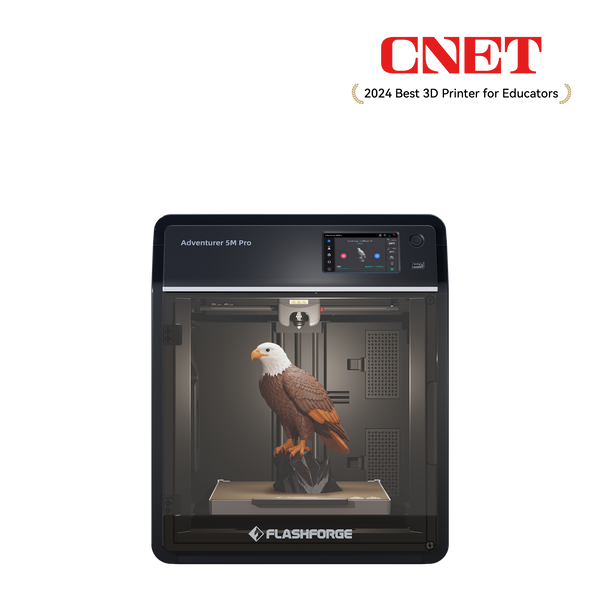
Adventurer 5M Pro
Auto Leveling Helps First Layers
First-layer failure is one of the most common beginner problems. Full-auto leveling helps set a proper nozzle distance without manual bed adjustment.
This makes PLA printing easier for new users who do not yet know how to judge bed distance by eye. A better first-layer setup also helps reduce lifting corners, weak adhesion, and early print failure.
Enclosed CoreXY Design Supports Stable Printing
The Adventurer 5M Pro uses an enclosed structure and a CoreXY metal frame. This gives beginners a more controlled printing setup than a fully open entry-level printer.
For PLA, the enclosed design helps reduce the effect of room drafts, while the printer’s external circulation mode supports filtration and cooling. The CoreXY structure also supports smoother motion during faster prints.
Strong PLA and Everyday Filament Compatibility
The Adventurer 5M Pro is well suited for PLA and PETG, and it also gives users room to explore ABS, ASA, TPU, PLA-CF, and PETG-CF with the right nozzle and settings.
This matters for beginners because PLA is usually the first material, not the last one. A printer with broader filament compatibility makes it easier to start with PLA and later test tougher or more specialized materials.
Workspace-Friendly Features for Home and Classroom Use
The Adventurer 5M Pro includes camera monitoring, filament run-out reminder, power-loss recovery, a removable PEI build plate, and internal plus external circulation with HEPA and activated carbon filtration.
These features support smoother daily printing. Beginners can monitor progress, remove finished PLA prints more easily, and reduce the chance of wasting filament when a spool runs low or a power interruption happens.
A Practical Fit for PLA Learning Projects
The 220 × 220 × 220 mm build volume is large enough for many beginner PLA prints, home organizers, toys, classroom models, and creative desk projects.
For someone learning 3D printing, the value is not only speed. The stronger fit is the overall workflow: easier setup, stable printing, cleaner first layers, and enough material flexibility to keep learning after the first PLA spool.
Conclusion
PLA plastic is the best starting material for most FDM 3D printing beginners. It prints easily, shows good detail, comes in many finishes, and works well for decorative models, prototypes, classroom projects, and light-duty indoor parts.
Its limits are heat, impact, outdoor exposure, and food-contact use. Use PLA when printability and visual quality matter most. Move to PETG, TPU, ASA, ABS, or engineering materials when the part needs stronger performance.
For a beginner-focused PLA workflow, the Flashforge Adventurer 5M Pro is a strong fit. Its auto-leveling, enclosed CoreXY structure, PEI build plate, camera monitoring, filtration system, and broad filament compatibility help make PLA printing more stable, easier to learn, and easier to expand from.
FAQ About PLA Plastic 3D Printing
What is PLA plastic for 3D printing?
PLA plastic is a filament material used in FDM 3D printing. It melts in the printer’s hot end and is deposited layer by layer to form a model. It is popular because it prints easily, shows clean detail, and works well for beginner projects.
Is PLA good for beginner 3D printing?
Yes. PLA is one of the best starting materials for beginners because it prints at relatively low temperatures, warps less than many other plastics, and usually works well with standard slicer profiles. It is a good first choice for learning bed adhesion, cooling, and print quality.
Can any 3D printer use PLA?
Most FDM 3D printers can print PLA if they support the correct filament diameter, nozzle temperature, and bed setup. Resin printers cannot use PLA filament because they use liquid resin instead. Always check the printer’s supported material list before printing.
Why is my PLA hard to print?
PLA can become hard to print when the bed is dirty, the first layer is too high or too low, the nozzle temperature is wrong, or the filament has absorbed moisture. Start with cleaning the plate, running leveling, checking the first layer, and using the default PLA profile.
Can you drink out of a PLA 3D-printed cup?
Do not treat a regular PLA 3D-printed cup as drink-safe by default. Food-contact safety depends on certified materials, additives, printer cleanliness, surface finish, and intended use. FDM layer lines can also trap residue and make cleaning difficult.
Is PLA plastic toxic when heated?
PLA is generally easier to use indoors than stronger-smelling materials such as ABS, but heated 3D printing can still release particles and VOCs. Use the recommended temperature range, avoid overheating filament, and keep the printer in a ventilated space.
What temperature should PLA print at?
A common PLA nozzle range is about 180°C to 230°C. Many standard PLA filaments print well around 200°C to 215°C. Bed temperature is often around 50°C to 60°C, depending on the build surface and filament brand.
Is AD5M Pro good for PLA printing?
Yes. The Flashforge Adventurer 5M Pro is a strong PLA printer for beginners because it combines full-auto leveling, an enclosed CoreXY structure, a removable PEI plate, camera monitoring, filament run-out reminder, and broad filament compatibility. These features help make PLA printing easier and more stable.
SEO Title: PLA Plastic 3D Printing Guide for Beginners | Flashforge
Meta Description: Learn what PLA plastic is, how safe it is, what settings work best, and why Adventurer 5M Pro is a stable beginner-friendly PLA 3D printer.