Choosing the best multicolor 3D printer filament involves more than picking attractive colors. Material type, printing temperature, feeding stability, layer adhesion, and the final use of the part can all affect print quality. Multicolor filament may also refer to rainbow or co-extrusion filament that changes color within a single spool, but this guide focuses mainly on choosing separate colors and materials for multicolor printing systems. It covers the main filament types, compatibility factors, use cases, and practical tips to help you choose a combination that prints reliably and fits your project.
What Types of Filament Are Available for Multicolor 3D Printing?
Multicolor 3D printing supports several filament types, each suited to different visual, functional, or flexible applications.

PLA and Silk PLA for Colorful Decorative Prints
PLA is a practical choice for colorful models because it prints reliably, shrinks very little, and comes in many colors. It works well for toys, figurines, signs, and desk decorations. Silk PLA adds a glossy finish for display pieces, although its flow may require slightly different settings.
PETG for Stronger Everyday Parts
For parts that need more toughness, PETG is useful for organizers, brackets, storage labels, and other everyday items. Solid and translucent colors provide more design options, but stringing can become more noticeable in multicolor prints, so temperature, retraction, and filament dryness matter.
TPU and TPE for Flexible Multicolor Models
Flexible materials such as TPU and TPE suit grips, protective covers, soft toys, and wearable parts. A multicolor phone case, for example, can use contrasting flexible sections for buttons or edges. Because softer filament is harder to feed consistently, a stable feed path and proper drying help reduce extrusion problems.
ABS and ASA for Durable Functional Parts
ABS and ASA are better suited to housings, brackets, prototypes, and outdoor parts that need greater heat or weather resistance. For example, ASA works well for outdoor labels or equipment markers. Since both materials shrink as they cool, an enclosed 3D printer and stable thermal conditions are usually preferred.
PVA and BVOH for Dissolvable Supports
PVA and BVOH are water-soluble support filaments rather than decorative color materials. They are useful for internal channels, complex overhangs, and geometries where conventional supports are difficult to remove. Both absorb moisture quickly, so dry storage and proper preparation are essential for reliable extrusion.
Which Filaments Are Best for Multicolor 3D Printing?
The best combinations are usually filaments that behave similarly during extrusion, cooling, and layer bonding.
Filaments With Similar Printing Temperatures
Materials that print within a similar nozzle-temperature range are easier to combine, so checking the recommended settings for different filaments can help prevent large temperature mismatches. Large temperature differences can lead to weak bonding, oozing, or inconsistent extrusion when switching between filaments.
Filaments With Stable Flow and Feeding
Consistent diameter and predictable flow help reduce under-extrusion and feeding errors during repeated color changes. This is especially important for long multicolor prints with dozens or hundreds of switches.
Filaments With Compatible Layer Adhesion
Two filaments may print well separately but still bond poorly to each other. For mixed-material parts, choose combinations with compatible surface and cooling behavior so the color or material boundaries remain strong.
Filaments With Strong Color Coverage
Opaque, highly pigmented filament usually produces cleaner color separation than translucent or lightly colored material. Strong coverage is especially useful when switching from dark to light colors, where residual material can otherwise affect the next section.
How to Choose Multicolor Filament by Use Case
The right filament depends on what the finished part needs to do, not just how many colors you want to print.
Toys and Decorative Models
PLA and Silk PLA are usually the best fit for colorful toys, figurines, signs, and display models. They offer broad color choices, low shrinkage, and attractive surface finishes without demanding complex temperature control.
Functional and Durable Parts
PETG is a stronger option for brackets, organizers, housings, and everyday functional parts. It combines good toughness with a wide color range, making it practical when both appearance and durability matter.
Flexible and Mixed-Material Prints
TPU and TPE work well for grips, flexible joints, soft toys, and protective components. For mixed-material models, choose filaments with compatible temperatures and reliable bonding, since combining soft and rigid materials can be more demanding than simple color changes.
Outdoor and Engineering Parts
ABS and ASA are better suited to parts exposed to heat, mechanical stress, or outdoor conditions. ASA is particularly useful for exterior applications, while both materials generally benefit from an enclosed and temperature-stable printing environment.
Complex Models and Soluble Supports
For internal channels, difficult overhangs, or enclosed geometry, PVA and BVOH can replace conventional breakaway supports. These water-soluble filaments simplify support removal but require careful drying and storage because they absorb moisture quickly.
What Affects Multicolor Print Success?
Even good filament can fail in a multicolor 3D printing workflow if temperature, feeding, or color changes are poorly controlled.
Temperature and Adhesion Compatibility Between Filaments
Materials with very different printing temperatures or shrinkage rates are harder to combine reliably. Similar thermal behavior helps maintain consistent extrusion, stronger bonding, and more stable dimensions across color or material boundaries.
Filament Dryness and Feeding Stability
Moisture can reduce extrusion consistency and make repeated filament changes less reliable. Common signs of wet filament include:
- Excessive stringing
- Popping or bubbling during extrusion
- Rough or uneven surfaces
- Inconsistent filament flow
- Weak or brittle printed sections
These problems are especially common with TPU, PVA, BVOH, and nylon-based materials, so proper drying and storage become more important in long multicolor prints.
Printer Design and Filament-Switching Reliability
For projects with frequent color changes, the switching system can affect both reliability and filament use. Shared-nozzle systems repeatedly unload, reload, and purge filament, so more switches can mean more residual color, feeding interruptions, and waste. Independent-toolhead designs avoid much of this repeated handling. For example, the Flashforge Creator 5 uses four independent FlashSwap toolheads, keeping each color or material loaded separately and reducing repeated loading, cross-color purging, and color contamination.
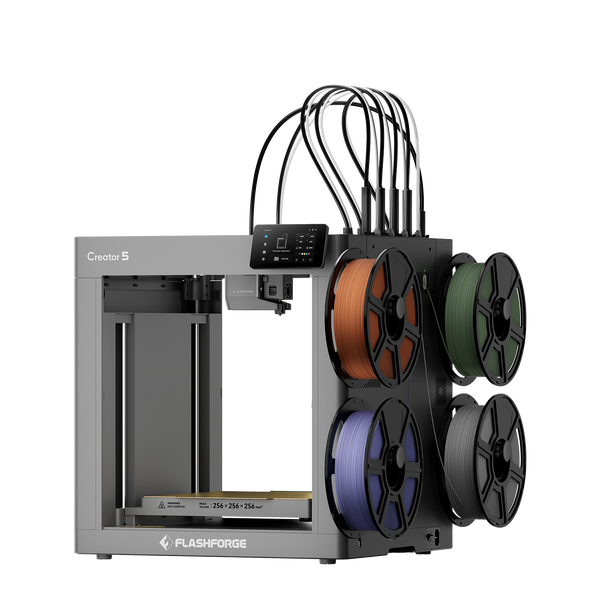
Flashforge Creator 5 4-Toolheads Multi-Color 3D Printer | 500% Faster, Zero Purge Waste
Nozzle, Flow, and Toolhead Calibration
Accurate flow and nozzle calibration help different colors meet cleanly without gaps, excess material, or visible offsets, while Flash Studio Desktop provides the slicing controls needed to fine-tune print settings before a multicolor job. Multi-toolhead printers also require precise toolhead alignment so each material is deposited in the correct position.
Model Design and Color-Change Frequency
A model with hundreds of small color changes places more demand on the printer than one with several large color regions. Designing larger continuous color areas can shorten print time, simplify switching, and reduce unnecessary purge material.
Tips for Better Multicolor Filament Printing
A few checks before printing can prevent most feeding, adhesion, and color-transition problems.

Dry and Store Filament Properly Before Printing
Proper 3D printer filament storage helps keep TPU, PVA, BVOH, and other moisture-sensitive materials sealed and dry before printing. Wet filament can cause stringing, rough surfaces, bubbles, and unstable extrusion, which become more noticeable during repeated color changes.
Pair Materials With Similar Temperatures and Shrinkage Rates
Filaments with similar nozzle temperatures and cooling behavior are easier to combine. Large differences in shrinkage or thermal requirements can lead to weak bonding, warping, or separation between materials.
Calibrate Temperature and Flow for Each Filament
Do not assume every color or material will print well with the same settings. Small differences in pigments and additives can affect flow, so test temperature and extrusion before starting a large multicolor model.
Adjust Purge Volumes to Reduce Color Bleeding and Waste
Purge enough material to clear the previous color, but avoid excessive flushing. Dark-to-light transitions often require more purging than similar colors, while overly high purge volumes increase filament waste without improving the final result.
Limit Unnecessary Color Changes and Print a Test Model First
Frequent switching can increase print time and purge demand, particularly on shared-nozzle systems. Simplify small color regions where possible, then print a short test model to check adhesion, color separation, and purge settings before committing to a long job.
Conclusion
The best multicolor 3D printer filament depends on the model, required strength, flexibility, environment, and printer setup. PLA works well for most colorful projects, while PETG, TPU, ABS, ASA, PVA, and BVOH support more specialized needs. A multicolor desk sign may only need PLA, for example, while a flexible phone case or outdoor label calls for a more suitable material. Reliable results also depend on dry filament, material compatibility, accurate calibration, and smooth color changes.
FAQ
Does Multicolor 3D Printing Require Special Filament?
No. Color printing can use standard compatible filaments such as PLA or PETG. Special materials are only needed for specific workflows, such as PVA or BVOH for dissolvable supports.
How Many Filament Colors Can a 3D Printer Use at Once?
It depends on the printer. Some systems handle two or four colors, while expandable platforms may support more. Always check the number of available filament paths, extruders, or toolheads before buying.
Can You Print Multiple Colors Without a Multicolor System?
Yes. Manual filament changes can produce simple multicolor prints, especially when colors change at specific layer heights. However, complex patterns or frequent color changes are much easier with an automated multicolor system.
Is Rainbow Filament the Same as Multicolor 3D Printing?
No. Rainbow filament changes color gradually along a single strand, so the color transition depends on how much filament is extruded. Multicolor printing uses separately controlled filaments to place specific colors in selected areas.
How Much Extra Filament Does Multicolor Printing Use?
The amount varies by printer design and number of color changes. Shared-nozzle systems may require purge material during each switch, so models with frequent transitions generally create more waste than designs with fewer changes or separate toolheads.
Should You Buy Multicolor Filament Sets or Individual Spools?
Sets are convenient for beginners who want coordinated colors at once. Individual spools are better when you need specific shades, materials, or larger quantities of frequently used colors.