3D printing turns digital ideas into useful objects, creative models, and personalized gifts. A broken drawer knob, a phone stand sized for a crowded desk, or a custom nameplate can all become practical projects rather than off-the-shelf purchases. This guide covers 30 cool things to 3D print in 2026, along with the materials, printer features, and settings that can help produce better results.
Why Is 3D Printing Ideal for Practical and Creative Projects?
What makes desktop 3D printing useful is its ability to produce parts for a specific task, space, or user. Instead of adapting a standard product to your needs, you can change the dimensions, shape, or function before printing.
Turn Everyday Ideas Into Custom Solutions
Small everyday problems often make the best 3D printing projects. A 3D printer can produce a cable clip that fits the edge of your desk, a replacement knob for an older cabinet, or an organizer sized around a particular drawer. Because the model can be adjusted before printing, the finished part can fit the actual space rather than a standard size.
Personalize and Test Designs With Less Waste
Customization is also easier when the design remains digital until printing begins. Names, dimensions, mounting holes, or decorative details can be changed without rebuilding the entire project. For example, before printing a full charging dock, a small section can be tested first to confirm that the phone and watch fit correctly, reducing wasted filament if the dimensions need adjustment.
How to Turn a Cool Idea Into a Finished 3D Print
A successful print usually starts well before the machine begins moving. The model, material, slicer settings, and finishing method should all match the intended use, whether the project is a simple desk accessory or a multi-part mechanical design.

Find or Create a 3D Model for Your Project
A good print starts with a model that fits the project and printer. Ready-made STL or 3MF files work well for common items, while custom parts may need simple edits or a 3D model created in CAD. For example, a cable holder may only need its width adjusted to fit a thicker desk. Before slicing, check dimensions, wall thickness, and moving clearances.
Choose the Right Filament for the Intended Use
Choose filament based on how the finished part will be used. PLA works well for decorative models and general indoor projects, PETG offers greater durability for functional parts, and TPU suits flexible items. Heat, moisture, impact, and outdoor exposure should also influence your material choice.
Prepare the Model and Adjust the Slicer Settings
The right slicer settings help balance print quality, strength, and printing time. Import the model, select the correct printer and filament profile, then adjust layer height, infill, supports, orientation, and print speed when needed. Previewing the sliced model can reveal unsupported areas or unnecessary material before printing.
Print, Assemble, and Finish the Final Project
The final stage is to print the model and complete any required post-processing. Check the first layers before leaving a longer print to run, then remove supports and assemble multi-part designs after printing. Sanding, painting, or light surface finishing can improve the appearance of decorative projects, while functional parts should be checked for fit and movement before regular use.
30 Cool Things to 3D Print in 2026
These 30 cool things to 3D print cover practical organizers, print-in-place models, personalized designs, multi-color projects, and creative gifts that fit today’s desktop 3D printing workflows.
Practical Prints for Home and Everyday Use
These projects solve small everyday problems and are generally easy to customize for your space or routine.
-
Reusable Bag Clips for Food Storage
-
Wall-Mounted Key and Mail Holder
-
Compact Phone Stand
-
Modular Drawer Organizer
-
Personalized Pet Food Scoop for Dry Food
-
Self-Watering Plant Spike
-
Custom Replacement Knob
-
Phone and Watch Charging Dock
Useful Prints for Desks, Workshops, and Organization
Organization projects are especially well suited to 3D printing because dimensions can be tailored to specific tools, devices, and workspaces.
-
Cable Clips for Desks and Entertainment Centers
-
Ergonomic Laptop Stand
-
Stackable Desk Organizer
-
SD Card and USB Drive Holder
-
Drill Bit Organizer
-
Small-Parts Sorting Tray
-
Custom Measuring Guide
-
Corner Clamp for Assembly Projects
Fun Toys, Games, and Interactive Projects
Interactive models are among the most fun things to 3D print because they demonstrate moving joints, print-in-place mechanisms, and modular design.
-
Articulated Dragon
-
Print-in-Place Fidget Cube
-
Mechanical Puzzle Box
-
Custom Dice Tower
-
Personalized Chess Set
-
Modular Board Game Insert
-
Tabletop Gaming Miniatures
-
Buildable Robot Toy
-
Modular Marble Run
Creative Decorations and Personalized Gifts
Personalized prints work particularly well as gifts because digital designs can be adapted with names, photos, colors, or decorative details before printing.
-
Lithophane Photo Lamp
-
Personalized Nameplate
-
Custom Coasters and Drink Markers
-
Tensegrity Sculpture
-
Hidden-Compartment Gift Box
Choosing the Right 3D Printer for Practical and Creative Projects
The right 3D printer should match the projects you actually plan to make. A beginner printing phone stands or drawer organizers may value automatic setup, while large props, multi-color models, or mixed-material parts can require more build space and specialized hardware.

Beginner-Friendly 3D Printers for First-Time Makers
A beginner-friendly printer should reduce setup and maintenance work. The Flashforge Adventurer 5M combines automatic leveling, quick-detach nozzles, and a 220 × 220 × 220 mm build volume, making it suitable for phone stands, organizers, and simple toys.
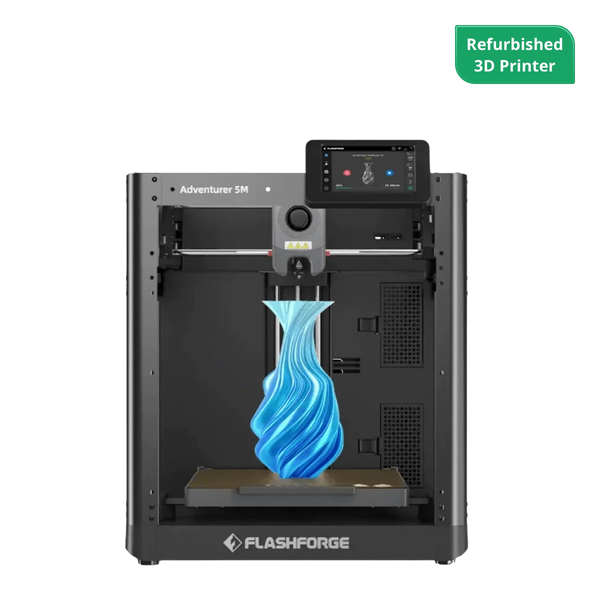
Aventure Flashforge 5M
The Flashforge Adventurer 5M 3D Printer offers an exceptional 3D printing experience with its reliable features and advanced design.
For classrooms or family projects, the Flashforge Adventurer 5M Pro adds an enclosed design, HEPA and activated-carbon filtration, and camera monitoring. These features make it better suited to shared indoor spaces, although children should still use a 3D printer with adult supervision.
Multi-Color and Multi-Material Features for Creative Prints
Independent toolheads are useful when a project combines several colors or materials. The Flashforge Creator 5 uses four independent toolheads, allowing different filaments to stay loaded separately and reducing repeated unloading, reloading, and purging compared with shared-nozzle systems.
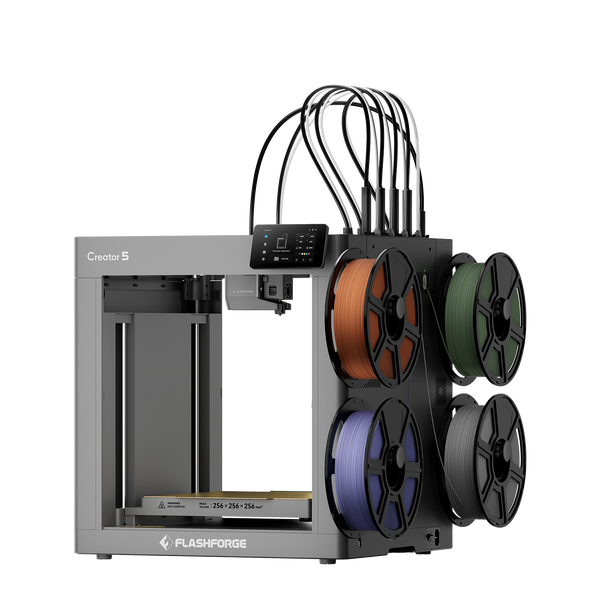
Flashforge Creator 5 4-Toolheads Multi-Color 3D Printer | 500% Faster, Zero Purge Waste
Build Volume and Extruder Options for Larger Projects
Larger projects require enough build volume and the right extrusion system. A standard 220 mm desktop build area handles many household prints, while tall props and prototypes may need more space. The Guider 3 Ultra offers up to 330 × 330 × 600 mm in single-extruder mode, while its dual-extruder system supports complex prints and soluble-support workflows.
Key Features for Reliable Everyday Printing
Reliable everyday printing depends more on workflow features than headline speed alone. Automatic bed leveling, stable motion, suitable filament profiles, and easy nozzle maintenance can reduce manual adjustments, while camera monitoring makes longer prints easier to check.
Tips for Better Results With Your 3D Printing Projects
Good results depend on a few checks before and during the print, especially adhesion, orientation, clearances, and finishing. Check critical dimensions, first-layer adhesion, and model orientation before committing to the full project.
Start With a Small Test Print
A small test print can reveal problems before you waste time and filament on the full model. Test critical dimensions, joints, or surface details first, especially when printing a new design or filament.
Before committing filament to a large project, use a small test model and calibrate your 3D printer to verify the first layer, extrusion, and dimensional accuracy.
Improve First-Layer Adhesion Before Printing
A reliable first layer gives the rest of the print a stable foundation. Keep the build plate clean, confirm leveling and Z-offset, and use suitable bed temperatures for the selected filament.
Reduce Supports Through Better Model Orientation
Good model orientation can reduce support material and improve surface quality. Orient the model to minimize unnecessary supports while considering print stability, surface finish, and the direction of load on functional parts.
Check Clearances for Moving and Interlocking Parts
Good fit depends on the gap between moving parts. A print-in-place hinge that looks correct on screen may fuse if the clearance is too tight, while loose tolerances can make gears or snap-fit parts wobble. When fit matters, a small tolerance test is safer than reprinting the full model.
Sand, Assemble, or Paint the Finished Print Carefully
Post-processing can improve both appearance and final fit, but different projects need different levels of finishing. A decorative nameplate may benefit from sanding and paint, while a functional bracket only needs clean support removal and accurate mating surfaces. Sand rough surfaces gradually and test-fit parts before applying glue or coatings.
Common Challenges With 3D Printing Projects
Most failed prints leave visible clues. A corner lifting from the bed points to a different problem than thin, inconsistent extrusion or a sudden layer shift, so troubleshooting should start with the symptom rather than random setting changes.
Poor Bed Adhesion and Warping
A lifting corner or loose first layer usually points to poor bed contact. Dust, an incorrect Z-offset, or unsuitable bed temperature can all contribute. With warp-prone materials, even a cold draft near a window or air vent may be enough to distort a larger print.
Stringing, Blobs, and Rough Surfaces
Fine strands between two towers often indicate that temperature or retraction needs attention. Rough surfaces and blobs can also appear when filament has absorbed moisture or extrusion is inconsistent. Dry filament and a well-tuned temperature profile usually provide a better starting point than changing several settings at once.
Layer Shifts and Dimensional Inaccuracy
A model that suddenly steps sideways often points to a motion-system problem, such as belt tension, mechanical resistance, or overly aggressive settings. Dimensional errors show up differently: a printed lid may not fit its box, or a hole may come out too small. In those cases, calibration and part tolerances deserve closer attention.
Weak Parts, Clogs, and Under-Extrusion
Thin walls, gaps between lines, or missing material often signal poor extrusion. A partially blocked nozzle, restricted filament path, or incorrect temperature can reduce flow enough to weaken the print. For example, a tool holder may look complete but crack under load if several layers were under-extruded.
Conclusion
Useful 3D printing projects do not have to be complicated. A simple cable organizer, replacement knob, or phone stand can be just as rewarding as a multi-color model or moving mechanism when it solves a real need. With the right material, sensible settings, and a little testing, these cool things to 3D print can become reliable parts, gifts, and creative projects rather than one-off experiments.
FAQ
Can You Sell 3D Prints Made From Downloaded Files?
Yes, but only if the model’s license allows commercial use. Check the license before selling; for example, CC BY permits commercial use with attribution, while CC BY-NC restricts commercial use.
How Much Filament Do Small 3D Printing Projects Use?
It depends on the model size, infill, supports, and wall thickness. The most accurate approach is to slice the model first, as slicer software can estimate filament use in grams and meters before printing.
Can Failed 3D Prints Be Recycled or Reused?
Sometimes. Thermoplastics such as PLA and ABS can potentially be processed into recycled filament, but material must be properly sorted and suitable recycling equipment or services are required.
Is It Safe to Leave a 3D Printer Running Overnight?
Leaving a 3D printer completely unattended is not recommended. Follow the printer manufacturer’s safety instructions and use adequate ventilation, as desktop 3D printing can involve emissions and other equipment-related safety hazards.
What 3D Prints Sell Fast?
There is no single 3D print that consistently sells fastest. Demand varies by marketplace, season, niche, price, and competition, although personalized gifts and useful custom products can have strong sales potential.